产品展示
信息图
界面稿
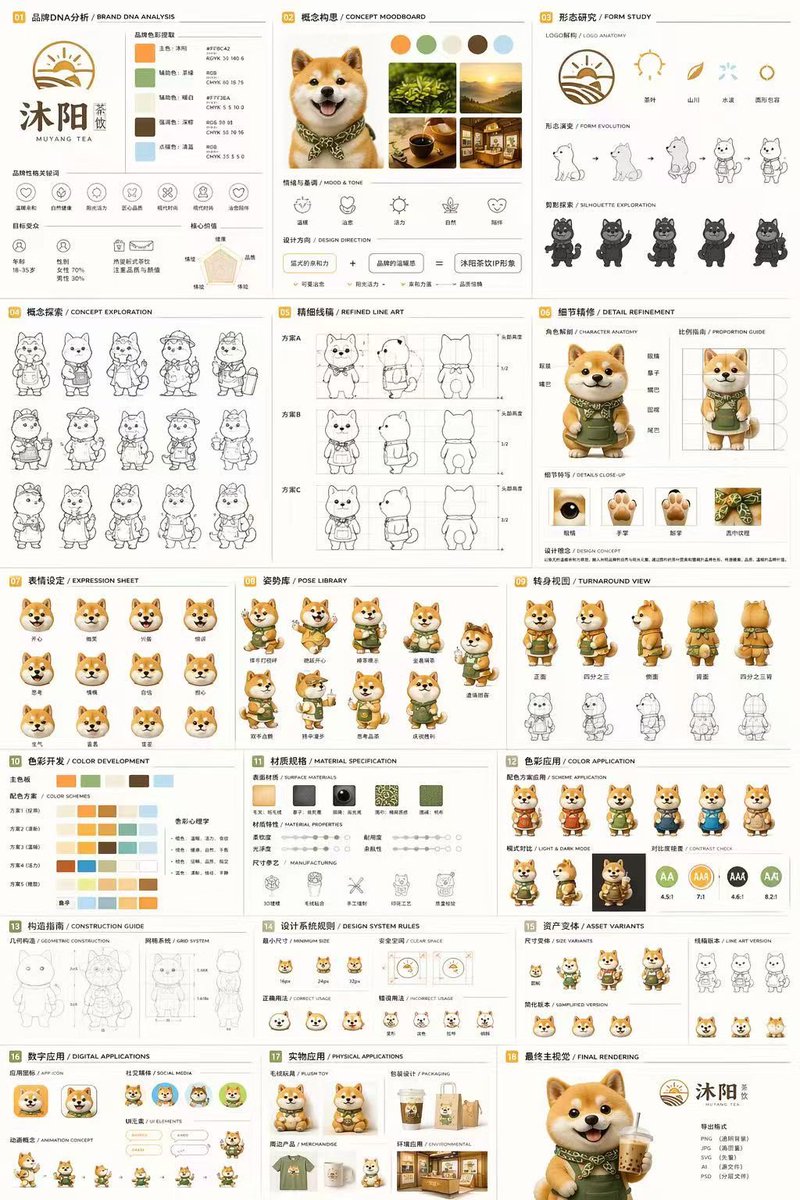
产品视觉 GPT Image 2 提示词:18-Panel Mascot Brand Identity Document
A comprehensive 18-section brand guideline and character design sheet for a 3D mascot, detailing everything from moodboards and line art to 3D turnarounds and physical mockups.
📝 提示词
{
"type": "18-panel brand identity and character design document",
"brand": {
"name": "{argument name="brand name" default="沐阳 MUYANG TEA"}",
"industry": "{argument name="industry" default="tea shop"}",
"colors": ["{argument name="primary color" default="yellow"}", "{argument name="secondary color" default="green"}", "white", "brown", "dark green"]
},
"subject": "{argument name="character description" default="3D rendered cute Shiba Inu mascot wearing a green apron"}",
"layout": {
"grid": "3 columns by 6 rows",
"sections": [
{
"title": "01 品牌DNA分析 / BRAND DNA ANALYSIS",
"elements": ["logo", "5 color swatches", "6 icons", "target audience charts"]
},
{
"title": "02 概念构思 / CONCEPT MOODBOARD",
"elements": ["5 photo references", "4 mood icons", "design equation"]
},
{
"title": "03 形态研究 / FORM STUDY",
"elements": ["4 logo anatomy icons", "4 evolution steps", "4 silhouettes"]
},
{
"title": "04 概念探索 / CONCEPT EXPLORATION",
"elements": ["12 line-art character sketches"]
},
{
"title": "05 精细线稿 / REFINED LINE ART",
"elements": ["3 rows of front and side line art with proportion guides"]
},
{
"title": "06 细节精修 / DETAIL REFINEMENT",
"elements": ["2 full-body renders with labels", "4 circular close-ups"]
},
{
"title": "07 表情设定 / EXPRESSION SHEET",
"elements": ["11 3D rendered head expressions"]
},
{
"title": "08 姿势库 / POSE LIBRARY",
"elements": ["9 full-body 3D rendered poses"]
},
{
"title": "09 转身视图 / TURNAROUND VIEW",
"elements": ["5 full-body 3D renders", "5 matching line-art views"]
},
{
"title": "10 色彩开发 / COLOR DEVELOPMENT",
"elements": ["5 rows of 5-color palettes", "color psychology text"]
},
{
"title": "11 材质规格 / MATERIAL SPECIFICATION",
"elements": ["5 texture swatches", "property sliders", "4 manufacturing icons"]
},
{
"title": "12 色彩应用 / COLOR APPLICATION",
"elements": ["4 color variant renders", "2 light/dark renders", "4 contrast rating circles"]
},
{
"title": "13 构造指南 / CONSTRUCTION GUIDE",
"elements": ["2 line-art diagrams for geometry and grid"]
},
{
"title": "14 设计系统规则 / DESIGN SYSTEM RULES",
"elements": ["minimum size icons", "clear space diagram", "4 usage examples"]
},
{
"title": "15 资产变体 / ASSET VARIANTS",
"elements": ["3 size variants", "3 line-art variants", "3 simplified flat heads"]
},
{
"title": "16 数字应用 / DIGITAL APPLICATIONS",
"elements": ["1 app icon", "2 social avatars", "UI elements", "3-step animation cycle"]
},
{
"title": "17 实物应用 / PHYSICAL APPLICATIONS",
"elements": ["plush toy mockup", "packaging mockup", "merchandise mockup", "storefront mockup"]
},
{
"title": "18 最终主视觉 / FINAL RENDERING",
"elements": ["large high-res 3D render of mascot holding tea", "logo", "file format list"]
}
]
}
}
🎯 适合场景
适合快速搭建产品图、包装展示和品牌海报:主体、材质、背景与商业修图方向已经有框架,换掉变量就能开跑。
💡 改写建议
- 先替换变量里的品类、人物、城市、品牌色,不急着改整段结构。 把主体、构图和风格分开写,后续微调会更稳。