产品展示
信息图
教育科普
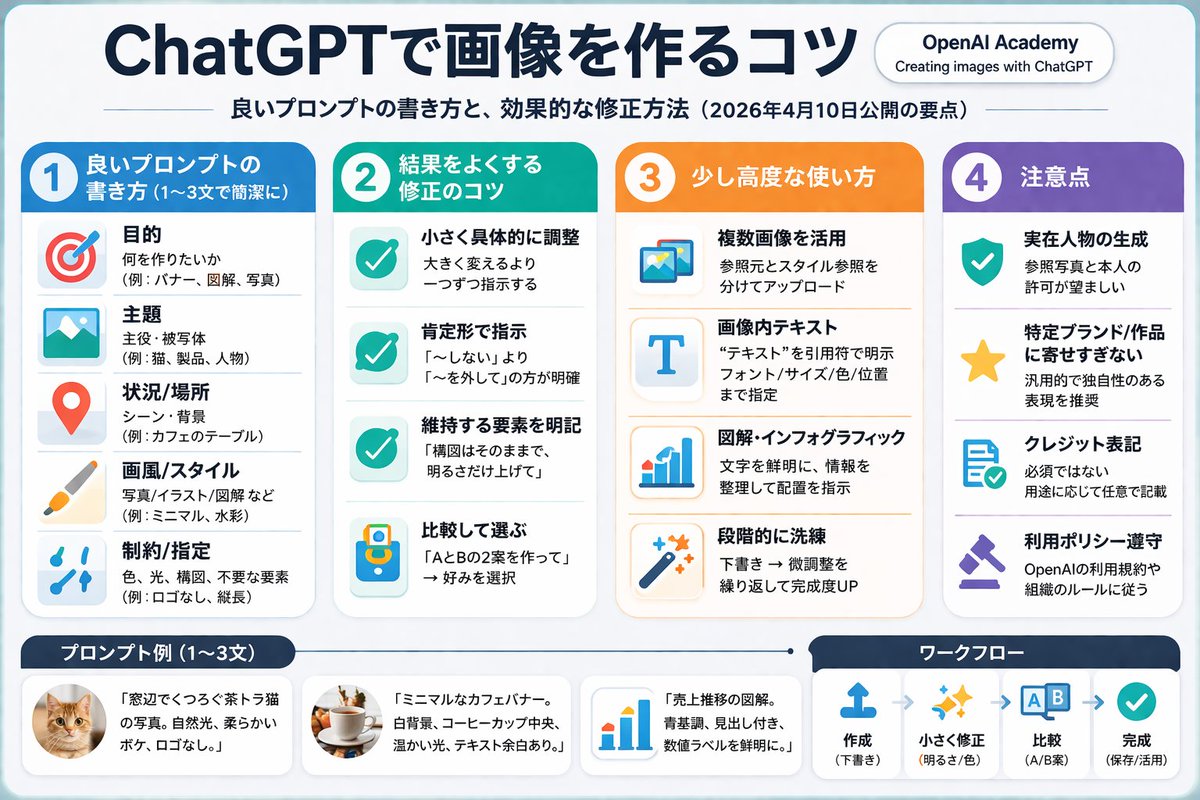
产品视觉 GPT Image 2 提示词:4-Column AI Image Generation Infographic
Generates a structured, 4-column infographic with a header, bulleted lists with icons, and a footer containing examples and a workflow diagram.
📝 提示词
{ "type": "infographic", "style": "clean, corporate, flat design, soft pastel colors, rounded corners, white background", "header": { "main_title": "{argument name="main title" default="AI assistantで画像を作るコツ"}", "subtitle": "{argument name="subtitle" default="良いプロンプトの書き方と、効果的な修正方法(2026年4月10日公開の要点)"}", "top_right_badge": "AI company Academy / Creating images with AI assistant" }, "layout": { "columns": [ { "color_theme": "blue", "header": "{argument name="column 1 title" default="1 良いプロンプトの書き方 (1〜3文で簡潔に)"}", "item_count": 5, "icons": ["target", "landscape picture", "map pin", "paintbrush", "sliders"] }, { "color_theme": "green", "header": "{argument name="column 2 title" default="2 結果をよくする修正のコツ"}", "item_count": 4, "icons": ["checkmark", "checkmark", "checkmark", "A/B comparison"] }, { "color_theme": "orange", "header": "3 少し高度な使い方", "item_count": 4, "icons": ["multiple images", "letter T", "bar chart", "magic wand"] }, { "color_theme": "purple", "header": "4 注意点", "item_count": 4, "icons": ["shield with check", "star", "document with check", "gavel"] } ], "footer": { "left_section": { "title": "{argument name="bottom left title" default="プロンプト例 (1〜3文)"}", "item_count": 3, "thumbnails": ["orange tabby cat", "coffee cup on white background", "blue bar chart"] }, "right_section": { "title": "ワークフロー", "step_count": 4, "icons": ["upload arrow", "sparkles", "A/B boxes", "checkmark"], "flow_style": "horizontal with dashed arrows" } } } }
🎯 适合场景
适合快速搭建产品图、包装展示和品牌海报:主体、材质、背景与商业修图方向已经有框架,换掉变量就能开跑。
💡 改写建议
- 先替换变量里的品类、人物、城市、品牌色,不急着改整段结构。 把主体、构图和风格分开写,后续微调会更稳。