信息图
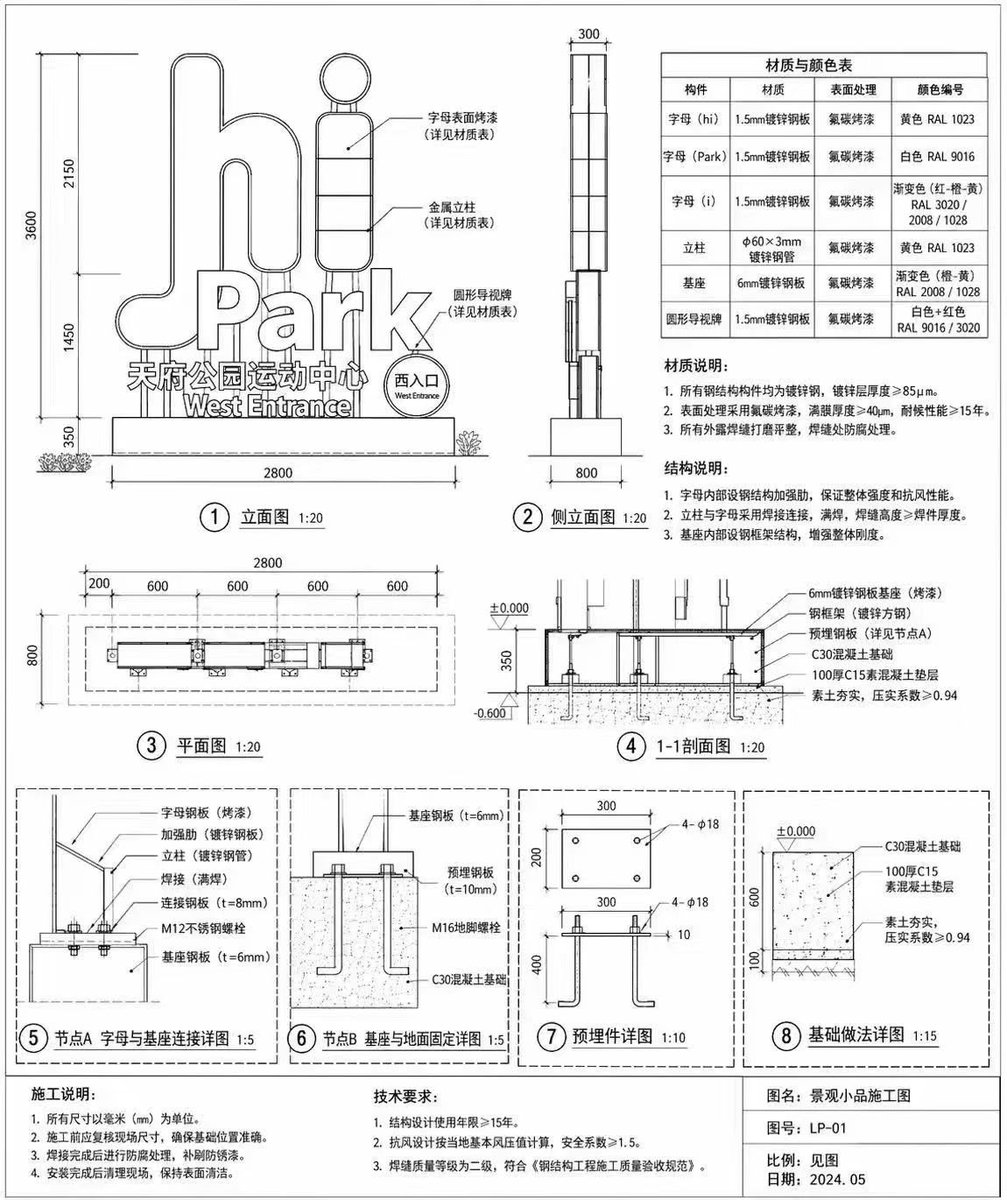
信息图 GPT Image 2 提示词:Architectural Signage Construction Drawing
Generates a detailed technical blueprint for an outdoor sign, complete with elevations, sections, detail nodes, and material tables.
📝 提示词
{
"type": "architectural construction drawing",
"subject": "outdoor landscape sign",
"style": "black and white technical line drawing, precise dimensions, engineering callouts, Chinese annotations",
"sign_details": {
"main_text": "{argument name="main sign text" default="hi Park"}",
"sub_text": "{argument name="sub sign text" default="天府公园运动中心"}",
"english_sub_text": "West Entrance"
},
"layout": {
"diagrams_count": 8,
"sections": [
{
"position": "top left",
"title": "① 立面图 1:20",
"description": "Front elevation showing overall dimensions and callouts pointing to the letters and base."
},
{
"position": "top middle",
"title": "② 侧立面图 1:20",
"description": "Side elevation showing depth dimensions."
},
{
"position": "top right",
"elements": [
{
"type": "table",
"title": "材质与颜色表",
"rows": 6,
"columns": 4
},
{
"type": "text_block",
"title": "材质说明:",
"points_count": 3
},
{
"type": "text_block",
"title": "结构说明:",
"points_count": 3
}
]
},
{
"position": "middle left",
"title": "③ 平面图 1:20",
"description": "Top-down plan view with horizontal dimensions."
},
{
"position": "middle right",
"title": "④ 1-1剖面图 1:20",
"description": "Cross-section view showing foundation and ground levels."
},
{
"position": "bottom row",
"description": "Four detailed node diagrams enclosed in dashed boxes.",
"details": [
"⑤ 节点A 字母与基座连接详图 1:5",
"⑥ 节点B 基座与地面固定详图 1:5",
"⑦ 预埋件详图 1:10",
"⑧ 基础做法详图 1:15"
]
}
],
"footer": {
"position": "bottom edge",
"blocks": [
{
"title": "施工说明:",
"points_count": 4
},
{
"title": "技术要求:",
"points_count": 3
},
{
"title": "title block",
"fields": [
"图名: {argument name="project title" default="景观小品施工图"}",
"图号: {argument name="drawing number" default="LP-01"}",
"比例: 见图",
"日期: {argument name="drawing date" default="2024.05"}"
]
}
]
}
}
}
🎯 适合场景
适合做图解、清单、路线图和知识长图:先锁定信息层级,再把文字量控制在模型能稳定处理的范围里。
💡 改写建议
- 先替换变量里的品类、人物、城市、品牌色,不急着改整段结构。 把主体、构图和风格分开写,后续微调会更稳。