界面稿
角色设定
故事叙事
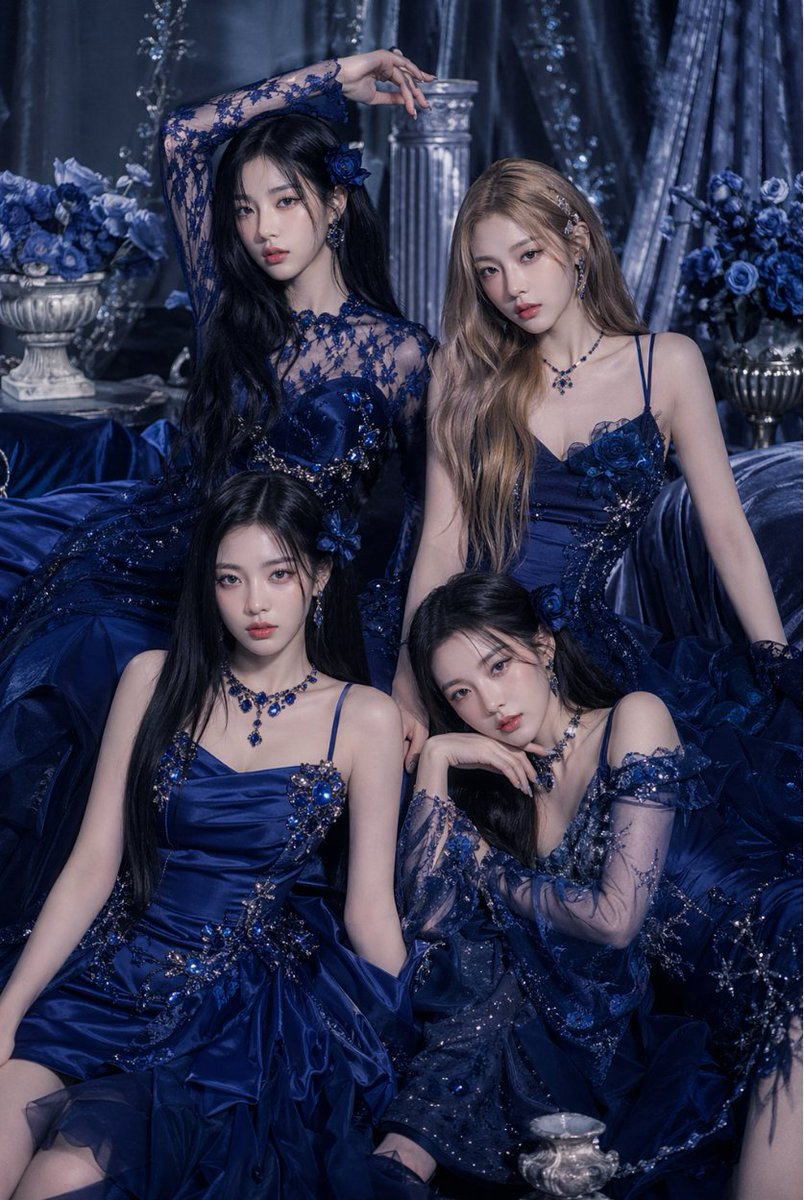
界面稿 GPT Image 2 提示词:Blue Couture Group Portrait
A moody luxury fashion prompt for generating an elegant group portrait of women in coordinated sapphire gowns for editorial, beauty, or formal campaign imagery.
📝 提示词
A luxurious studio fashion portrait of {argument name="group size" default="four"} elegant young women posed closely together in a dramatic royal-blue fantasy setting, all wearing coordinated deep sapphire and midnight-navy couture evening gowns with glittering beadwork, floral appliqué, sequins, lace sleeves, sheer mesh details, and voluminous layered skirts. The scene is monochromatic blue with a cool, moody, high-end editorial color grade. Arrange the women in a tight triangular composition: two standing or elevated in the back and two seated in front on draped fabric, with varied graceful poses, one woman raising an arm above her head, one leaning slightly, one seated upright, and one resting her chin on her hand. Their dresses should each be distinct but harmonized, featuring ornate crystal embellishments, embroidered flowers, and fitted bodices. Add matching sapphire jewelry including dangling earrings, gemstone necklaces, and floral hair accessories. Use long flowing hair in mixed dark black and soft light brown tones, styled smooth and glamorous. Surround them with opulent set dressing: 2 classical urn vases filled with blue roses, 1 fluted stone column in the background, heavy shimmering velvet curtains, and abundant draped satin fabric pooling around them. Lighting should be soft and diffused with subtle highlights on satin and jewels, creating a regal, mysterious, romantic atmosphere. Shoot as a vertical fashion editorial portrait, waist-up to full seated composition, highly detailed fabric textures, polished luxury beauty campaign aesthetic, no visible text.
🎯 适合场景
适合生成网页、App 或仪表盘界面稿:先保留模块结构,再替换成你的业务文案和品牌视觉。
💡 改写建议
- 先替换变量里的品类、人物、城市、品牌色,不急着改整段结构。 把主体、构图和风格分开写,后续微调会更稳。