产品展示
界面稿
社媒配图
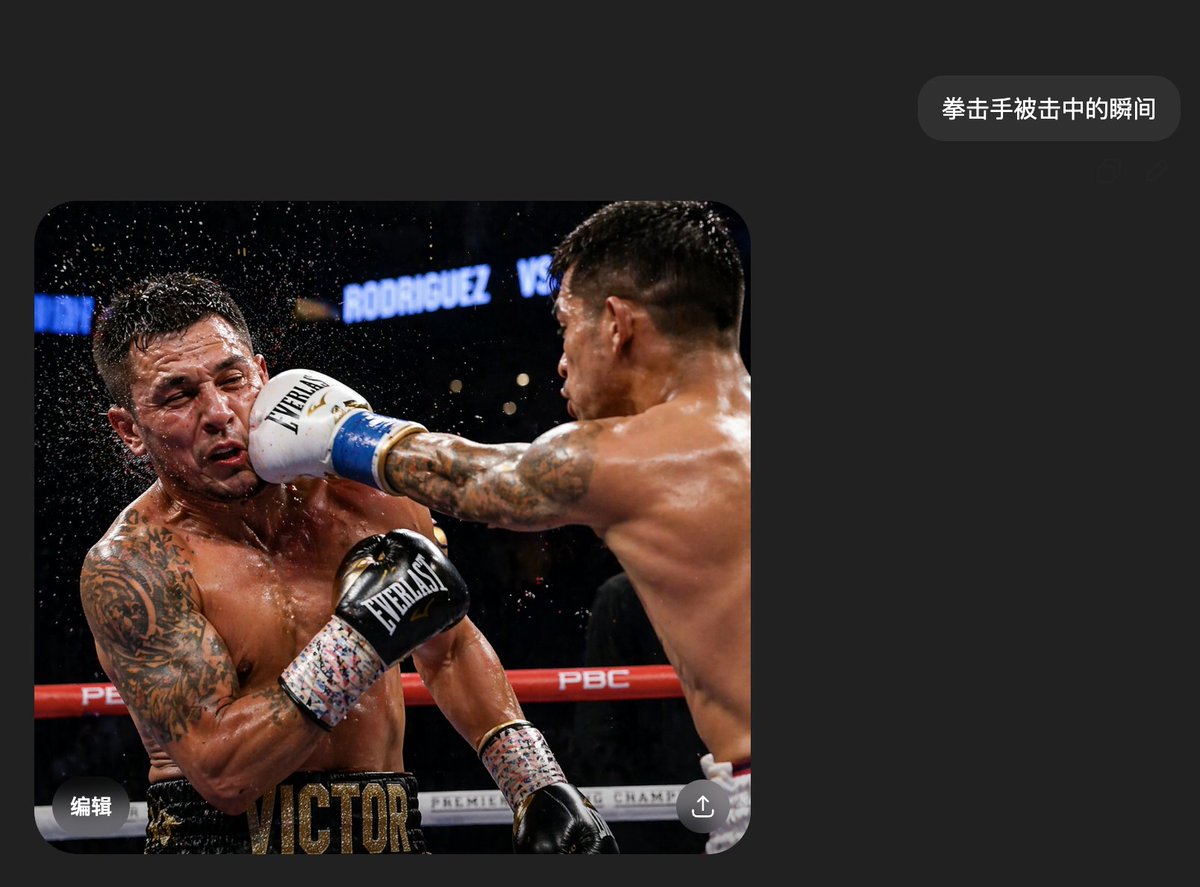
产品视觉 GPT Image 2 提示词:Boxing Impact Chat Screenshot
A photorealistic dark-mode chat screenshot featuring a dramatic boxing impact image, suitable for recreating viral social-media-style AI image demos.
📝 提示词
A realistic smartphone screenshot of a dark-mode chat interface in Chinese, minimalist and modern, with a charcoal black background and lots of empty space. Near the upper right is a single rounded dark-gray message bubble containing the white Chinese text {argument name="message text" default="拳击手被击中的瞬间"}. Below and to the left is one large embedded photo with rounded corners, occupying most of the lower-left half of the screen. The embedded photo shows the exact instant in a professional boxing match when one boxer lands a hard straight punch flush on the other boxer’s face. Two shirtless male boxers with muscular, sweaty bodies are inside a ring under arena lights. The boxer on the right is seen mostly from the back and side, extending his right arm fully across the frame; his back and shoulder muscles are sharply defined, and he has short dark hair and tattooed arms. He wears a white boxing glove with blue trim, and the glove is smashing into the left boxer’s face. The boxer on the left is recoiling from the impact, his head snapping sideways, with a spray of sweat and water droplets exploding outward around his head. He has a heavily tattooed left arm and chest, a black glove raised near his torso, and black trunks with large gold letters reading VICTOR across the waistband area. The ring ropes are red and white, with visible branding including PBC, and the dark blurred arena background includes bright signage reading RODRIGUEZ VS. The action photo should feel like a frozen high-speed sports photograph, dramatic, crisp, and photorealistic. Over both fighters’ faces are 2 rectangular mosaic-blur censor blocks, one on each face. Add small mobile UI overlay details on the image: the Chinese word 编辑 in white at the bottom-left corner of the photo and a circular share/upload icon at the bottom-right corner. Overall composition should look exactly like a casually shared AI-generated image shown inside a messaging app screenshot, clean, believable, and highly realistic.
🎯 适合场景
适合快速搭建产品图、包装展示和品牌海报:主体、材质、背景与商业修图方向已经有框架,换掉变量就能开跑。
💡 改写建议
- 先替换变量里的品类、人物、城市、品牌色,不急着改整段结构。 把主体、构图和风格分开写,后续微调会更稳。