产品展示
信息图
界面稿
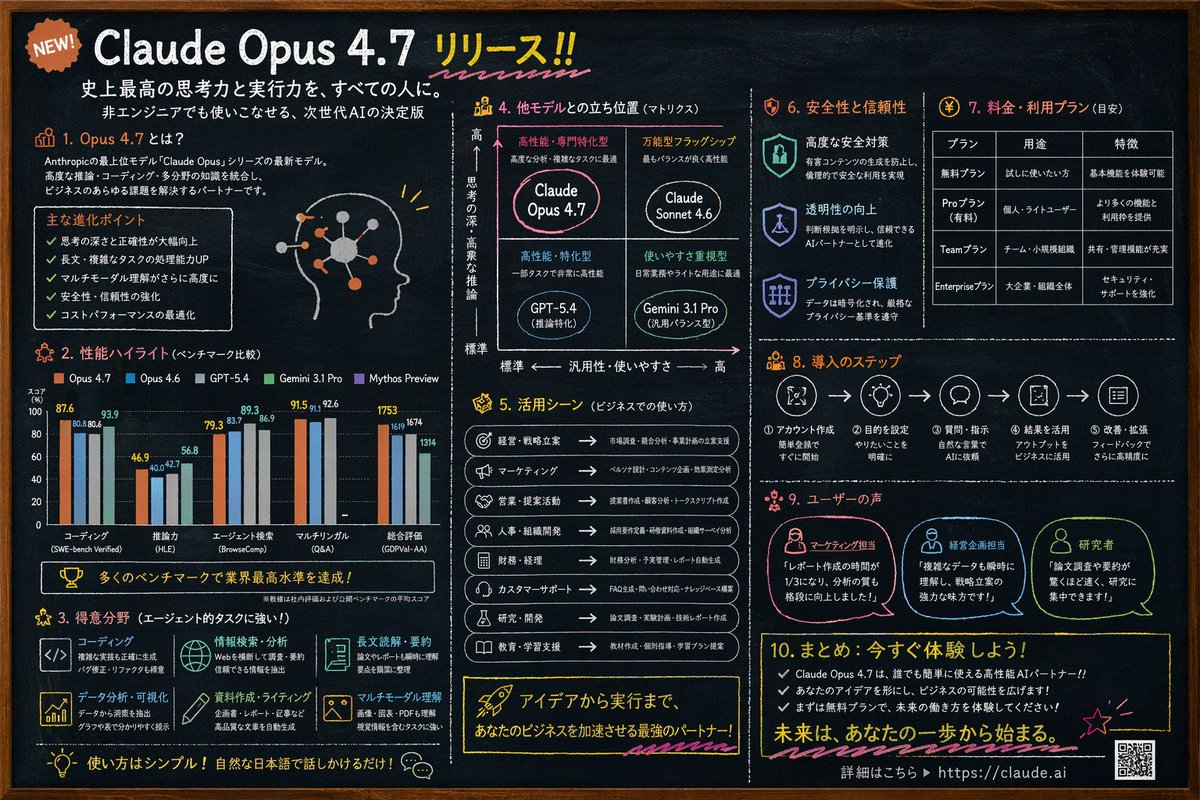
产品视觉 GPT Image 2 提示词:Chalkboard AI Product Infographic
Generates a highly detailed, 10-section chalkboard-style infographic for a software release, featuring charts, matrices, and tables.
📝 提示词
{
"type": "chalkboard style infographic",
"style": "dark slate background, white text, hand-drawn accents, clean typography",
"colors": {
"background": "dark slate grey",
"text": "white",
"accents": ["{argument name="accent color 1" default="orange"}", "{argument name="accent color 2" default="light blue"}", "yellow", "pink"]
},
"header": {
"badge": "NEW!",
"title": "{argument name="main headline" default="Claude Opus 4.7 リリース!!"}",
"subtitles": ["史上最高の思考力と実行力を、すべての人に。", "非エンジニアでも使いこなせる、次世代AIの決定版"]
},
"layout": {
"sections": [
{
"id": "1",
"title": "1. Opus 4.7 とは?",
"content": "Description text, 5 bullet points, profile head illustration with glowing neural nodes"
},
{
"id": "2",
"title": "2. 性能ハイライト (ベンチマーク比較)",
"content": "Grouped bar chart comparing 5 models across 5 categories: コーディング, 推論力, エージェント検索, マルチリンガル, 総合評価"
},
{
"id": "3",
"title": "3. 得意分野 (エージェント的タスクに強い!)",
"content": "2x3 grid of 6 strengths with icons: コーディング, 情報検索・分析, 長文読解・要約, データ分析・可視化, 資料作成・ライティング, マルチモーダル理解"
},
{
"id": "4",
"title": "4. 他モデルとの立ち位置 (マトリクス)",
"content": "2x2 positioning matrix with 4 quadrants: {argument name="product name" default="Claude Opus 4.7"}, Claude Sonnet 4.6, GPT-5.4, Gemini 3.1 Pro"
},
{
"id": "5",
"title": "5. 活用シーン (ビジネスでの使い方)",
"content": "List of 8 business use cases with icons and arrows"
},
{
"id": "6",
"title": "6. 安全性と信頼性",
"content": "3 vertical items with shield/lock icons: 高度な安全対策, 透明性の向上, プライバシー保護"
},
{
"id": "7",
"title": "7. 料金・利用プラン (目安)",
"content": "Data table with 3 columns and 4 rows for pricing tiers: 無料プラン, Proプラン, Teamプラン, Enterpriseプラン"
},
{
"id": "8",
"title": "8. 導入のステップ",
"content": "Horizontal flowchart with 5 numbered steps connected by arrows"
},
{
"id": "9",
"title": "9. ユーザーの声",
"content": "3 user testimonials with profile icons: マーケティング担当, 経営企画担当, 研究者"
},
{
"id": "10",
"title": "10. まとめ: 今すぐ体験しよう!",
"content": "3 bullet points, call to action, URL {argument name="website url" default="https://claude.ai"}, and a QR code"
}
]
}
}
🎯 适合场景
适合快速搭建产品图、包装展示和品牌海报:主体、材质、背景与商业修图方向已经有框架,换掉变量就能开跑。
💡 改写建议
- 先替换变量里的品类、人物、城市、品牌色,不急着改整段结构。 把主体、构图和风格分开写,后续微调会更稳。