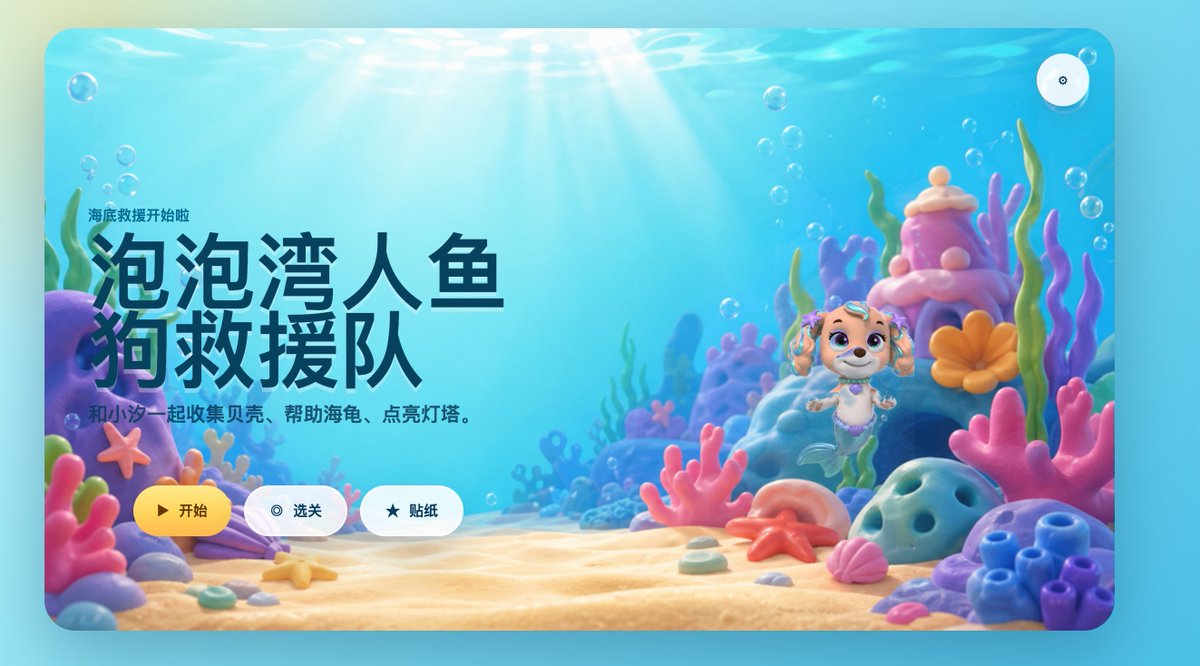
界面稿
角色设定
故事叙事
界面稿 GPT Image 2 提示词:Cute Mermaid Puppy Undersea Game Start Screen
This prompt generates a polished children's underwater game landing screen with Chinese UI text, a mermaid puppy hero, and colorful 3D coral reef scenery for app mockups or game key art.
📝 提示词
A bright, whimsical 3D underwater game start screen in a rounded-rectangle app window, designed like a polished children's casual game landing page. The scene is a colorful seabed with warm sun rays streaming down through clear turquoise water, soft floating bubbles throughout, and a sandy ocean floor covered with pastel coral and shells. On the left side, large bold Chinese title text dominates the composition: “泡泡湾人鱼狗救援队”, with a smaller line above it reading “海底救援开始啦” and a subtitle below reading “和小汪一起收集贝壳、帮助海龟、点亮灯塔。” Keep all text in clean modern UI typography, with the title in very large dark navy characters. On the right side, place a cute mermaid puppy character inspired by a preschool adventure cartoon style: a small smiling puppy with cream and light tan fur, big violet eyes, floppy ears decorated with teal accessories, a tiny purple shell necklace, and a mint-green mermaid tail, floating upright in the water. Surround the character with a magical coral reef environment containing exactly 10 prominent foreground and midground sea elements: 1 purple rock arch on the far left, 1 pink starfish attached to the left coral, 1 lavender clam shell near the bottom left, 1 large pink branching coral in the center foreground, 1 pink shell near the bottom right, 1 orange starfish on the sand near center-right, 1 blue porous rock on the right foreground, 1 cluster of blue tube coral at the far right, 1 tall pink-and-purple coral tower behind the character, and 1 orange flower-shaped coral beside the tower. Use a soft pastel palette of aqua, cyan, pink, lavender, peach, and coral orange, with glossy toy-like materials and gentle depth of field. Add three rounded UI buttons aligned horizontally near the bottom left-center: a yellow primary button labeled “开始” with a play icon, a white secondary button labeled “选关” with a circular target icon, and a white secondary button labeled “贴纸” with a star icon. Also add one small circular settings button with a gear icon in the top-right corner. Overall style: premium children’s mobile game splash screen, playful, comforting, cinematic lighting, high-end 3D illustration, friendly and inviting.
🎯 适合场景
适合生成网页、App 或仪表盘界面稿:先保留模块结构,再替换成你的业务文案和品牌视觉。
💡 改写建议
- 先替换变量里的品类、人物、城市、品牌色,不急着改整段结构。 把主体、构图和风格分开写,后续微调会更稳。