产品展示
信息图
界面稿
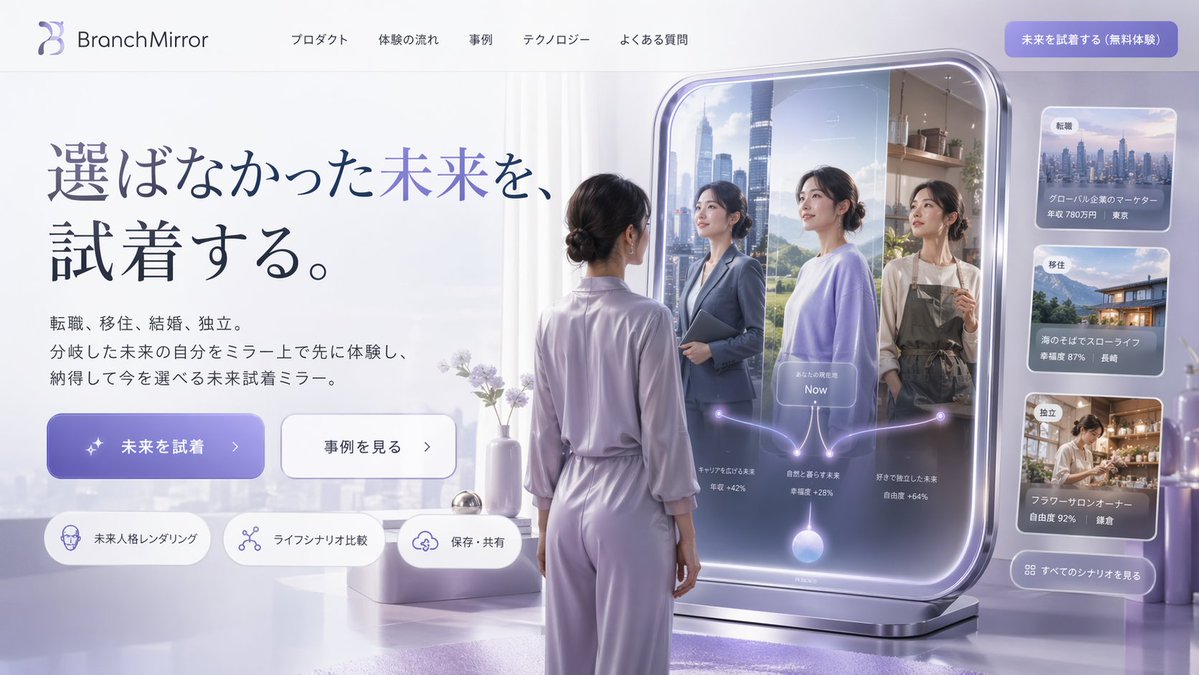
产品视觉 GPT Image 2 提示词:Futuristic Smart Mirror Website Mockup
Generates a modern, futuristic website landing page mockup featuring a smart mirror UI that displays branching life scenarios.
📝 提示词
{
"type": "website landing page mockup",
"style": "futuristic, clean, 3D render, corporate tech",
"color_palette": "{argument name="color palette" default="soft purple, lavender, and silver"}",
"header": {
"logo": "{argument name="brand name" default="BranchMirror"}",
"navigation_links": 5,
"cta_button": "solid purple button at top right"
},
"hero_section": {
"headline": "{argument name="main headline" default="選ばなかった未来を、試着する。"}",
"subtext": "paragraph of Japanese text explaining the product",
"buttons": [
{ "style": "solid purple", "text": "{argument name="primary button text" default="未来を試着"}", "icon": "sparkles" },
{ "style": "white outline", "text": "事例を見る", "icon": "arrow right" }
],
"feature_tags": {
"count": 3,
"style": "pill-shaped with icons",
"labels": ["未来人格レンダリング", "ライフシナリオ比較", "保存・共有"]
}
},
"main_visual": {
"subject": "{argument name="subject description" default="woman in lavender loungewear with hair in a low bun"}",
"pose": "standing, seen from behind, looking into a large freestanding smart mirror",
"smart_mirror_ui": {
"reflections": {
"count": 3,
"descriptions": [
"woman in business suit with city background",
"woman in casual sweater with nature background",
"woman in apron with cafe background"
]
},
"overlay_graphics": "glowing branching diagram starting from a bottom orb, splitting into 3 paths to each reflection, with a central 'Now' label"
}
},
"sidebar_ui": {
"cards": {
"count": 3,
"descriptions": [
"cityscape image with job change stats",
"coastal house image with relocation stats",
"flower shop image with independence stats"
]
},
"bottom_button": "glassmorphism button to see all scenarios"
}
}
🎯 适合场景
适合快速搭建产品图、包装展示和品牌海报:主体、材质、背景与商业修图方向已经有框架,换掉变量就能开跑。
💡 改写建议
- 先替换变量里的品类、人物、城市、品牌色,不急着改整段结构。 把主体、构图和风格分开写,后续微调会更稳。