产品展示
界面稿
角色设定
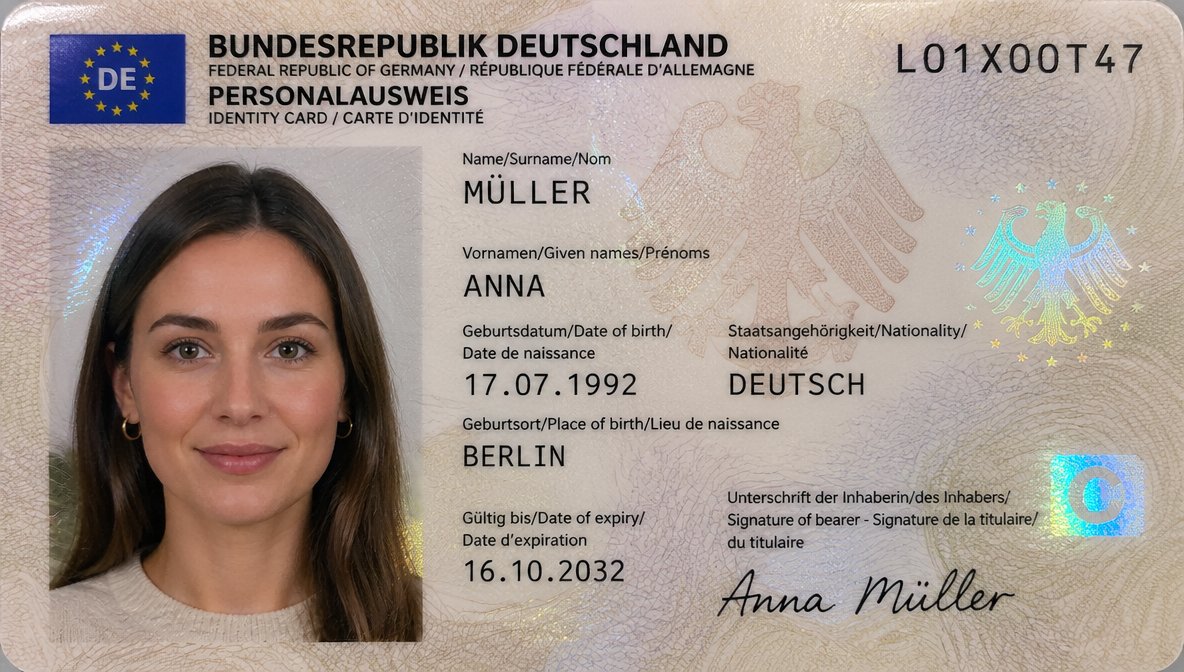
产品视觉 GPT Image 2 提示词:German ID Card Scan Transformation
This prompt turns a photographed German ID card reference into a polished, realistic official document scan with updated personal data and a cleaner passport-photo presentation.
📝 提示词
Using REFERENCE_0, recreate the same German ID card as a clean, realistic flat scan/passport-style document image instead of a photographed card on a dark table. Keep the person, card type, and overall identity-card layout, but remove the tabletop perspective, edge glare, and camera-phone look. Replace the photo area with a properly framed biometric portrait crop showing more of the shoulders and upper chest against a light neutral background, with soft even lighting suitable for an official ID photo. Update the card design to a more modern German ID appearance with a blue EU/DE flag block in the top-left, a cleaner cream security pattern, and holographic security elements including 2 eagle motifs and 1 blue square chip-like mark on the right. Keep the serial number as {argument name="document number" default="L01X00T47"}. Change the personal data to: surname MÜLLER, given name ANNA, date of birth {argument name="date of birth" default="17.07.1992"}, nationality DEUTSCH, place of birth {argument name="place of birth" default="BERLIN"}, expiry date {argument name="expiry date" default="16.10.2032"}, and signature {argument name="signature name" default="Anna Müller"}. Make it look like a high-resolution official ID card scan, sharp typography, realistic print texture, and subtle holographic reflections.
🎯 适合场景
适合快速搭建产品图、包装展示和品牌海报:主体、材质、背景与商业修图方向已经有框架,换掉变量就能开跑。
💡 改写建议
- 先替换变量里的品类、人物、城市、品牌色,不急着改整段结构。 把主体、构图和风格分开写,后续微调会更稳。