产品展示
界面稿
社媒配图
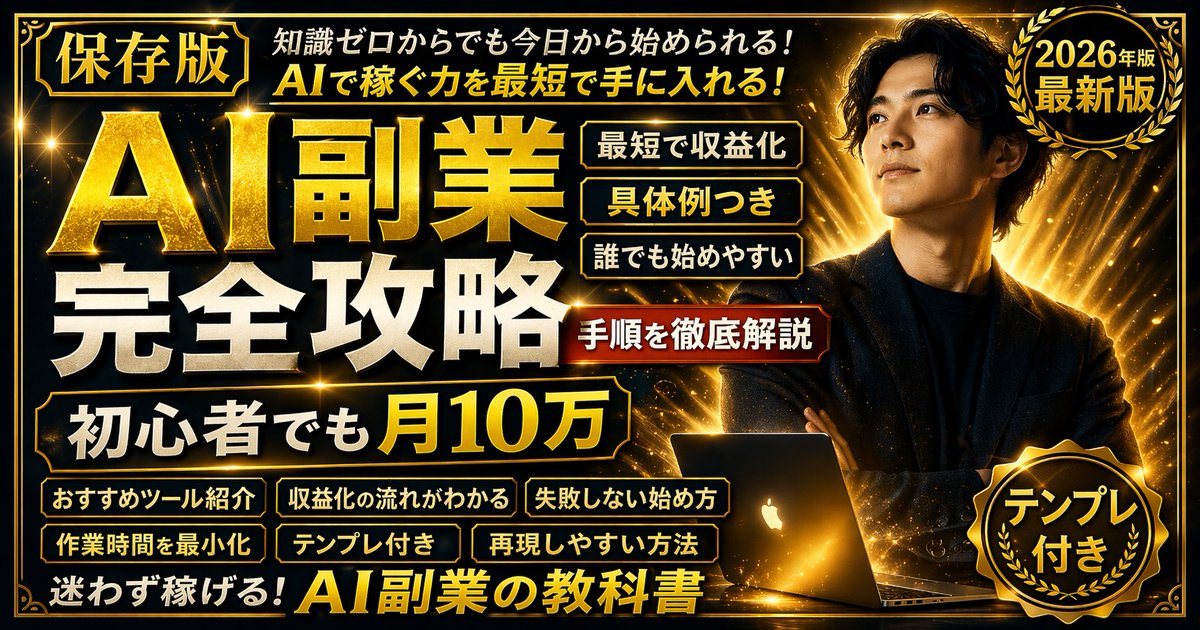
产品视觉 GPT Image 2 提示词:Gold & Black Info-Product Thumbnail
Generates a flashy, text-heavy promotional banner or video platform thumbnail featuring a confident subject and multiple structured text callouts.
📝 提示词
{
"type": "promotional banner / video platform thumbnail",
"style": "high contrast, flashy, professional, {argument name="theme color" default="gold and black"} palette, glowing light rays, sparkling particles",
"subject": {
"description": "{argument name="subject description" default="confident young Asian man in a dark suit with arms crossed"}",
"pose": "looking upwards to the right",
"props": "glowing open laptop in front of him"
},
"layout": {
"background": "dark with radiant gold light bursts",
"text_sections": {
"top_left_badge": "[保存版]",
"top_header": "{argument name="top text" default="知識ゼロからでも今日から始められる! AIで稼ぐ力を最短で手に入れる!"}",
"main_title": {
"text": "{argument name="main title" default="AI副業 完全攻略"}",
"style": "large, bold, 3D gold and white typography"
},
"subtitle_box": "{argument name="subtitle" default="初心者でも月10万"}",
"top_right_badge": {
"style": "gold laurel wreath",
"text": "2026年版 最新版"
},
"middle_right_tags": {
"count": 3,
"style": "stacked gold-bordered boxes",
"labels": ["最短で収益化", "具体例つき", "誰でも始めやすい"]
},
"middle_right_ribbon": {
"style": "red ribbon banner",
"text": "手順を徹底解説"
},
"bottom_left_tags": {
"count": 6,
"style": "2x3 grid of gold-bordered boxes",
"labels": ["おすすめツール紹介", "収益化の流れがわかる", "失敗しない始め方", "作業時間を最小化", "テンプレ付き", "再現しやすい方法"]
},
"bottom_footer": "迷わず稼げる!AI副業の教科書",
"bottom_right_badge": {
"style": "gold laurel wreath",
"text": "テンプレ付き"
}
}
}
}
🎯 适合场景
适合快速搭建产品图、包装展示和品牌海报:主体、材质、背景与商业修图方向已经有框架,换掉变量就能开跑。
💡 改写建议
- 先替换变量里的品类、人物、城市、品牌色,不急着改整段结构。 把主体、构图和风格分开写,后续微调会更稳。