产品展示
界面稿
角色设定
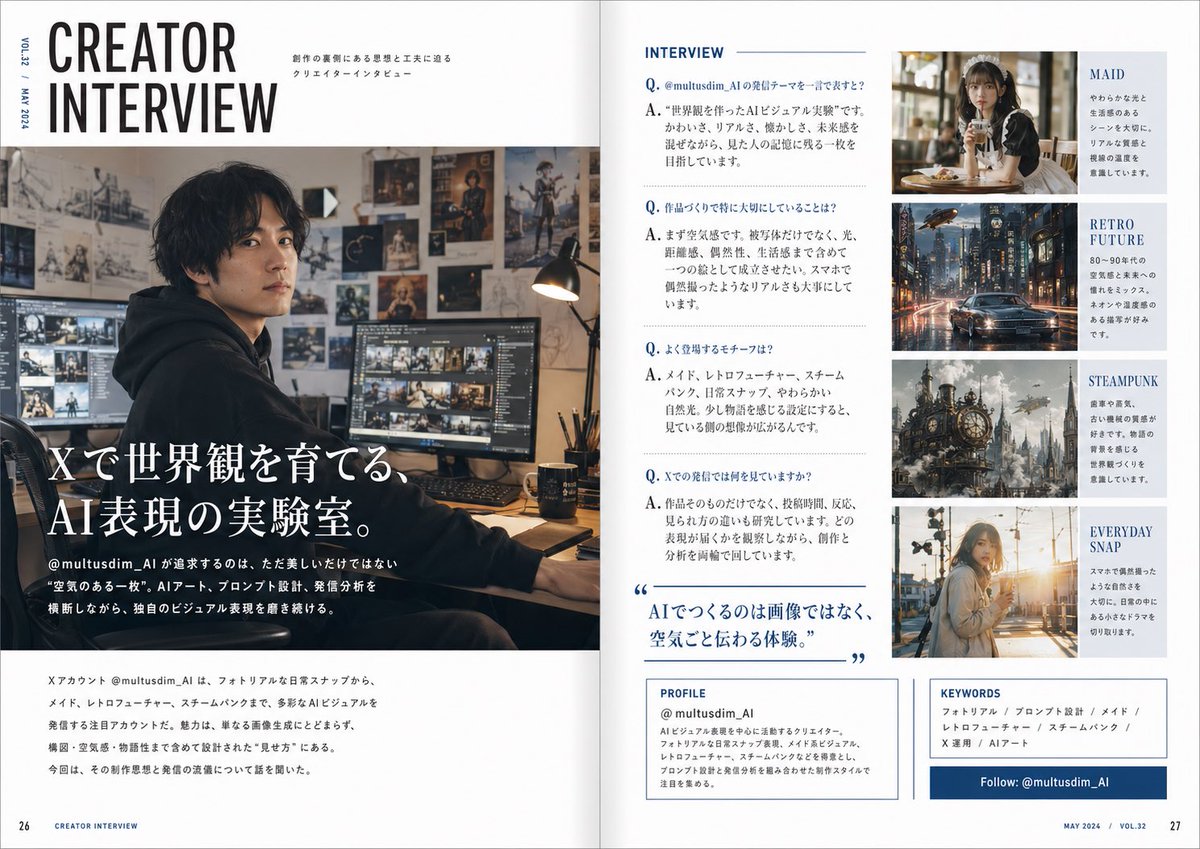
产品视觉 GPT Image 2 提示词:Japanese Creator Interview Magazine Spread
A stylish two-page Japanese editorial spread presenting an AI creator interview, useful for magazine mockups, profile features, and social-media creator showcases.
📝 提示词
Create a polished two-page magazine spread in Japanese, styled like a contemporary creator profile feature in a premium design and culture magazine. The layout is a clean editorial interview spread with a white background, navy blue accents, thin rule lines, elegant typography, and a balanced grid. The overall feeling is sophisticated, modern, and slightly masculine, like a feature on a handsome AI visual creator.
On the left page, place a very large stacked English headline at the top left reading “CREATOR INTERVIEW” in bold condensed sans-serif, with small vertical issue text along the outer margin such as “VOL.23 / MAY 2024.” Beneath and across most of the left page, use a large cinematic photo of a {argument name="creator identity" default="male AI visual creator"} sitting at a desk in a dark hoodie in a moody studio workspace. The face is intentionally soft-blurred or anonymized. The room is warm and dimly lit, with multiple monitors showing image-editing or visual-generation work, a desk lamp, and walls covered in concept art, posters, sketches, and fantasy artwork. Overlay the lower-left of the photo with a large Japanese feature title in white Mincho-style serif text: “Xで世界観を育てる、AI表現の実験室。” Add smaller Japanese body text beneath introducing the account @multusdim_AI and describing an experimental AI art practice that values atmosphere, prompt design, and visual worldbuilding. At the bottom of the left page, include a horizontal block of smaller Japanese editorial text summarizing the creator’s focus and interview context.
On the right page, create 5 clearly separated editorial sections. Section 1 is the main interview column titled “INTERVIEW” at the top in blue uppercase sans-serif. Below it, format 4 Q&A entries in Japanese, each beginning with a blue “Q.” and “A.” The questions and answers should discuss the creator’s reason for posting on X, what they care about when making work, recurring motifs, and what they observe in audience reactions. Midway down this same interview column, add a large blue pull quote in Japanese with oversized quotation marks: “AIでつくるのは画像ではなく、空気ごと伝わる体験。” Section 2 is a top-right image card with a warm café portrait of a soft, elegant maid-themed woman holding a drink, paired with the visible label “MAID” and a short Japanese blurb. Section 3 is a second image card below it showing a rainy retro-futuristic city street with a car and neon reflections, labeled “RETRO FUTURE” with a short Japanese blurb. Section 4 is a third image card below that featuring a detailed steampunk city or giant clockwork structure with smoke and brass machinery, labeled “STEAMPUNK” with a short Japanese blurb. Section 5 is a fourth image card at the bottom showing a casual everyday snapshot of a young woman outdoors in warm sunset light, labeled “EVERYDAY SNAP” with a short Japanese blurb.
At the bottom of the right page, add 3 boxed information panels. The first is a “PROFILE” box with the account name “@multusdim_AI” and several lines of Japanese profile text describing an AI visual creator focused on atmosphere-rich work blending photorealism, retro future, maid aesthetics, and steampunk. The second is a “KEYWORDS” box listing exactly 6 keyword items in Japanese separated by slashes: “フォトリアル / プロンプト設計 / メイド / レトロフューチャー / スチームパンク / X運用 / AIアート” with the same editorial feel. The third is a dark blue horizontal follow banner reading “Follow: @multusdim_AI”. Add page numbers 26 and 27 at the bottom corners and small footer text like “CREATOR INTERVIEW” and “MAY 2024 / VOL.32”. Use realistic magazine print spacing, sharp editorial hierarchy, and a highly believable Japanese magazine layout.
🎯 适合场景
适合快速搭建产品图、包装展示和品牌海报:主体、材质、背景与商业修图方向已经有框架,换掉变量就能开跑。
💡 改写建议
- 先替换变量里的品类、人物、城市、品牌色,不急着改整段结构。 把主体、构图和风格分开写,后续微调会更稳。