信息图
界面稿
角色设定
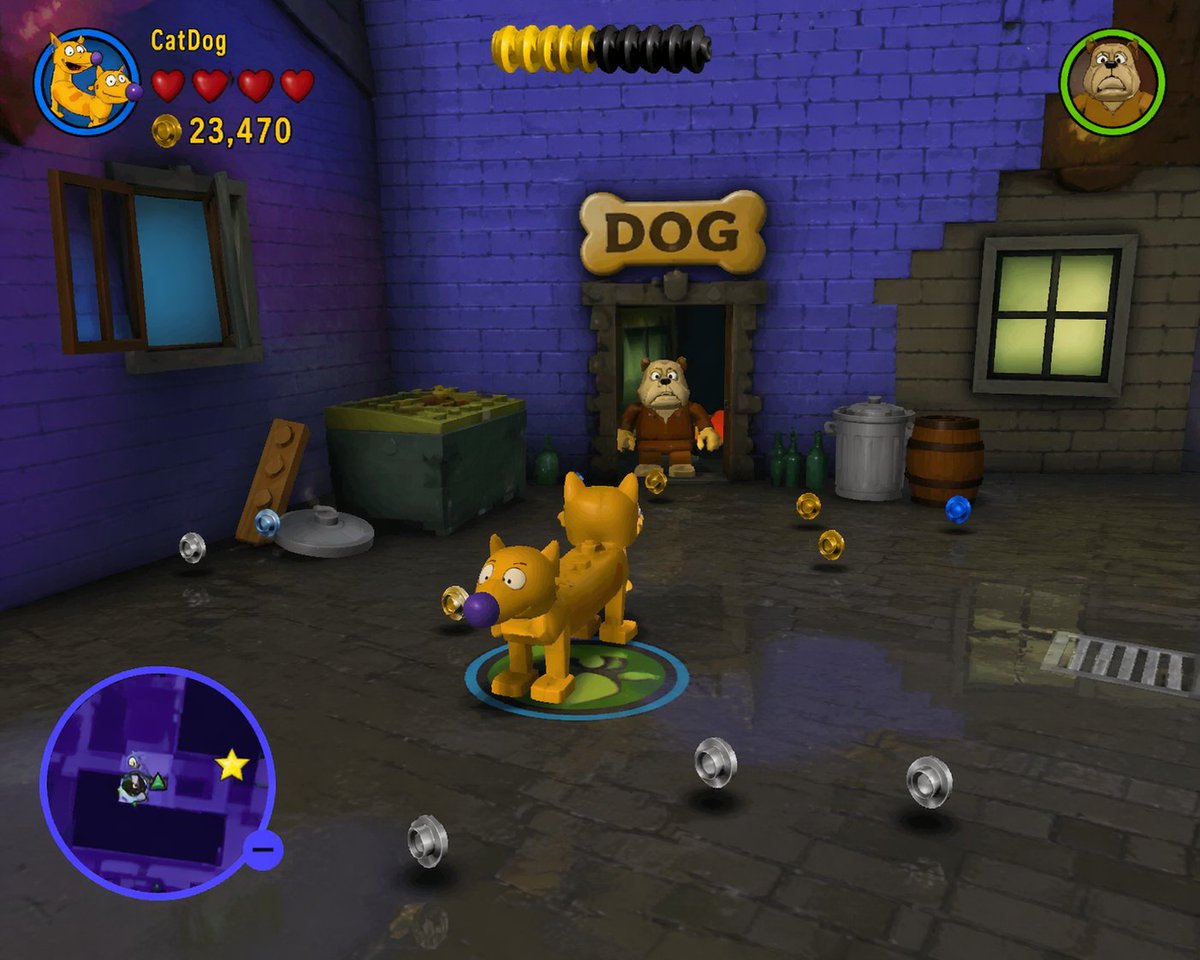
信息图 GPT Image 2 提示词:LEGO Video Game Mockup
A JSON-structured prompt for generating a fake screenshot of a classic LEGO video game featuring custom characters, environments, and a full HUD.
📝 提示词
{
"type": "video game screenshot",
"style": "{argument name="game style" default="classic LEGO video game"}",
"scene": {
"environment": "dark alleyway with purple brick walls on the left, grey brick walls on the right, wet cobblestone ground with reflections",
"props": ["1 green dumpster", "1 wooden plank with studs", "1 metal trash can", "1 wooden barrel", "3 green glass bottles", "1 bone-shaped sign reading 'DOG'"],
"collectibles": "10 floating studs (4 silver, 4 gold, 2 blue)"
},
"characters": [
{
"description": "{argument name="player character" default="CatDog"} rendered as a blocky plastic figure",
"action": "standing in the center on a glowing blue and green circular player marker"
},
{
"description": "bulldog rendered as a plastic minifigure",
"action": "standing in a doorway"
}
],
"layout": {
"ui_elements": [
{
"position": "top-left",
"description": "Player HUD",
"components": ["circular character portrait", "text '{argument name="player name" default="CatDog"}'", "4 red hearts", "gold coin icon with text '{argument name="score" default="23,470"}'"]
},
{
"position": "top-center",
"description": "yellow and black cylindrical progress meter"
},
{
"position": "top-right",
"description": "circular character portrait of a bulldog"
},
{
"position": "bottom-left",
"description": "circular minimap with purple border, map layout, and a yellow star icon"
}
]
}
}
🎯 适合场景
适合做图解、清单、路线图和知识长图:先锁定信息层级,再把文字量控制在模型能稳定处理的范围里。
💡 改写建议
- 先替换变量里的品类、人物、城市、品牌色,不急着改整段结构。 把主体、构图和风格分开写,后续微调会更稳。