信息图
界面稿
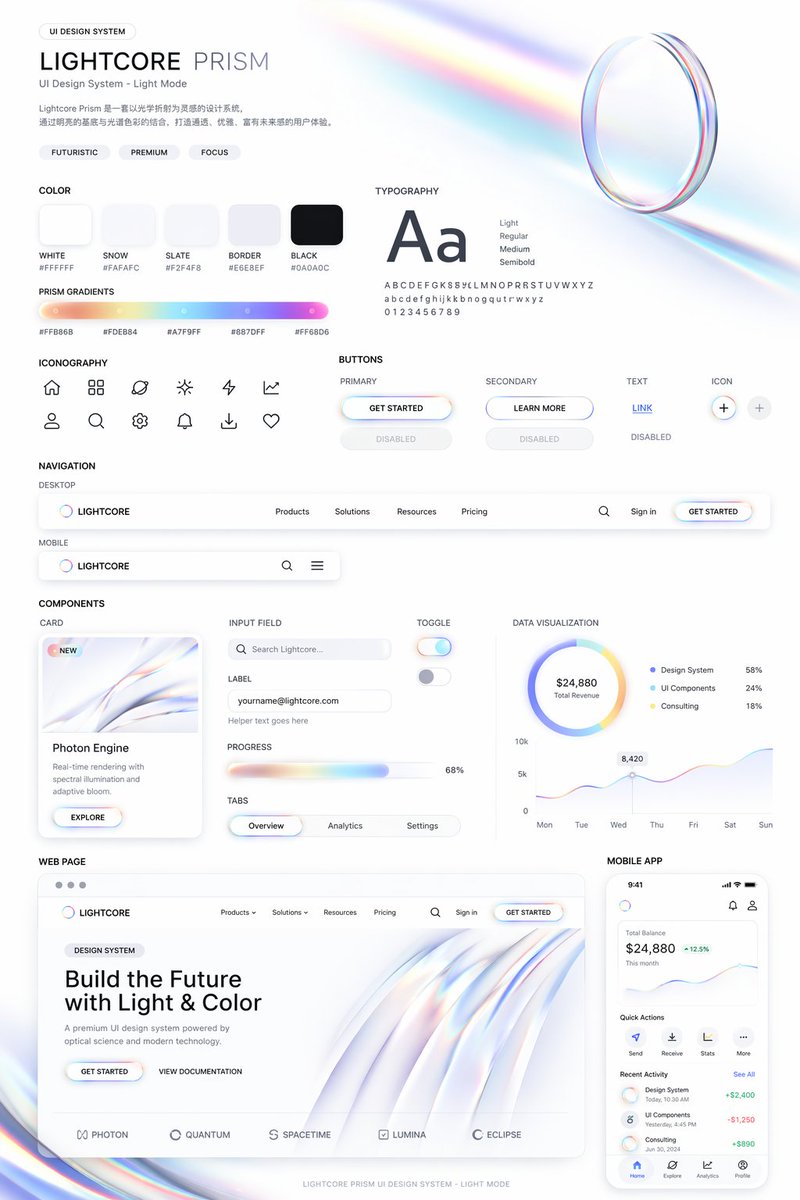
信息图 GPT Image 2 提示词:Light Mode UI Design System Board
Generates a comprehensive UI design system presentation featuring color palettes, typography, components, and responsive mockups with a futuristic, iridescent aesthetic.
📝 提示词
{
"type": "UI Design System presentation board",
"theme": "{argument name="visual theme" default="optical science and light refraction"}",
"overall_aesthetic": "clean white background, light mode, futuristic, premium, featuring {argument name="primary gradient colors" default="iridescent rainbow, pastel orange, yellow, cyan, purple, pink"} accents",
"header": {
"title": "{argument name="system name" default="LIGHTCORE PRISM"}",
"subtitle": "UI Design System - Light Mode",
"tags": ["FUTURISTIC", "PREMIUM", "FOCUS"],
"hero_graphic": "3D transparent glass ring refracting iridescent light"
},
"layout": {
"sections": [
{
"title": "COLOR",
"count": 5,
"labels": ["WHITE #FFFFFF", "SNOW #FAFAFC", "SLATE #F2F4F8", "BORDER #E6E8EF", "BLACK #0A0A0C"],
"description": "5 solid color swatches in rounded squares"
},
{
"title": "PRISM GRADIENTS",
"count": 1,
"description": "1 long horizontal gradient bar with 5 hex codes below it"
},
{
"title": "TYPOGRAPHY",
"description": "Large 'Aa' with 4 font weights listed (Light, Regular, Medium, Semibold) and full alphabet/numbers"
},
{
"title": "ICONOGRAPHY",
"count": 12,
"description": "12 minimalist line-art icons arranged in a 2x6 grid"
},
{
"title": "BUTTONS",
"count": 8,
"categories": ["PRIMARY", "SECONDARY", "TEXT", "ICON"],
"description": "8 total buttons showing normal and disabled states for each category. Primary button features an iridescent border and {argument name="primary button text" default="GET STARTED"} text."
},
{
"title": "NAVIGATION",
"count": 2,
"variants": ["DESKTOP", "MOBILE"],
"description": "Desktop nav has logo, 4 text links, search, sign in, and a button. Mobile nav has logo, search, and hamburger menu."
},
{
"title": "COMPONENTS",
"count": 6,
"items": [
"CARD: 'Photon Engine' with abstract iridescent graphic and button",
"INPUT FIELD: Search bar and email input with label",
"PROGRESS: Iridescent progress bar at 68%",
"TABS: Overview, Analytics, Settings",
"TOGGLE: 2 switches (on/off)",
"DATA VISUALIZATION: 1 donut chart with 3 legend items, 1 line chart over 7 days"
]
},
{
"title": "WEB PAGE",
"description": "Desktop browser mockup featuring the header '{argument name="hero headline" default="Build the Future with Light & Color"}', 2 buttons, a flowing 3D iridescent wave graphic, and 5 partner logos at the bottom."
},
{
"title": "MOBILE APP",
"description": "Smartphone mockup displaying a balance of $24,880, a line chart, 4 quick action icons, a recent activity list with 3 items, and a bottom navigation bar with 4 icons."
}
]
}
}
🎯 适合场景
适合做图解、清单、路线图和知识长图:先锁定信息层级,再把文字量控制在模型能稳定处理的范围里。
💡 改写建议
- 先替换变量里的品类、人物、城市、品牌色,不急着改整段结构。 把主体、构图和风格分开写,后续微调会更稳。