产品展示
界面稿
角色设定
产品视觉 GPT Image 2 提示词:Medieval Shot Reverse Shot
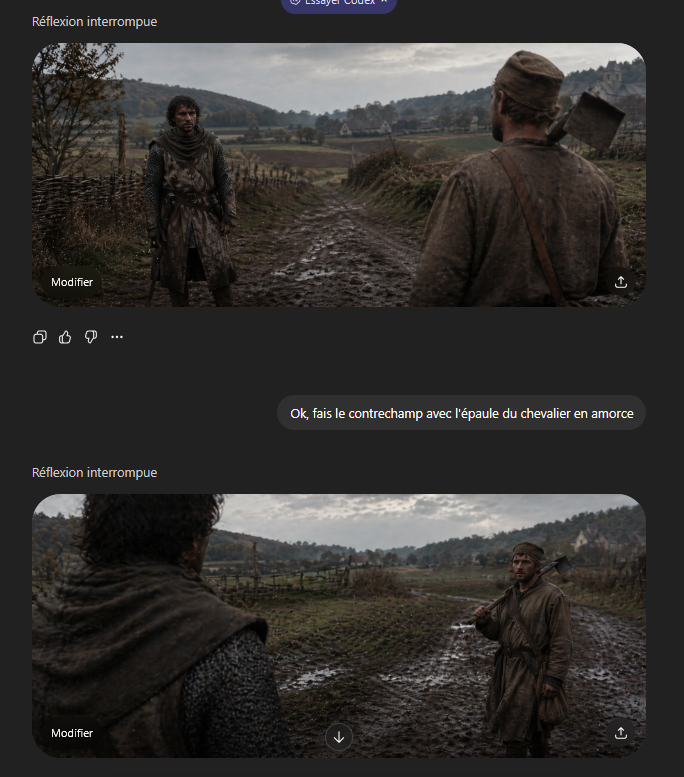
A cinematic two-angle medieval countershot scene for demonstrating over-the-shoulder framing and shot-reverse-shot composition.
📝 提示词
A cinematic medieval shot-reverse-shot pair presented as a gritty historical film still in an ultrawide 21:9 aspect ratio, overcast natural light, muted earth tones, damp autumn atmosphere, realistic muddy textures, shallow depth of field, and strong foreground shoulder framing. Set the scene on a rutted muddy country road running through a rural valley with rough wooden wattle fences on both sides, low rolling hills covered with sparse trees in the distance, open fields, and a small pale stone farmhouse or chapel on the far right hillside. The two characters face each other on the road. One is a weary medieval peasant man in a dirty brown tunic and cap, average build, carrying a wood-handled axe resting on his shoulder with a leather strap across his chest. The other is a knight or armed traveler in dark weathered chainmail and a worn hooded surcoat, standing still with a guarded posture. Create this as a grammar-of-cinema countershot demonstration: first frame shows the {argument name="foreground character" default="peasant man with axe"} from behind in the right foreground, his shoulder and back occupying the near right side of the frame, while the {argument name="background character" default="knight in chainmail"} stands full figure in the left midground facing camera on the muddy road; second frame reverses the angle and shows the knight’s shoulder and hooded back blurred in the left foreground while the peasant stands in the right midground holding the axe on his shoulder. Keep both shots consistent in location, weather, costume continuity, lens feel, and character spacing, with subdued dramatic realism and a tense conversational standoff.
🎯 适合场景
适合快速搭建产品图、包装展示和品牌海报:主体、材质、背景与商业修图方向已经有框架,换掉变量就能开跑。
💡 改写建议
- 先替换变量里的品类、人物、城市、品牌色,不急着改整段结构。 把主体、构图和风格分开写,后续微调会更稳。