产品展示
界面稿
角色设定
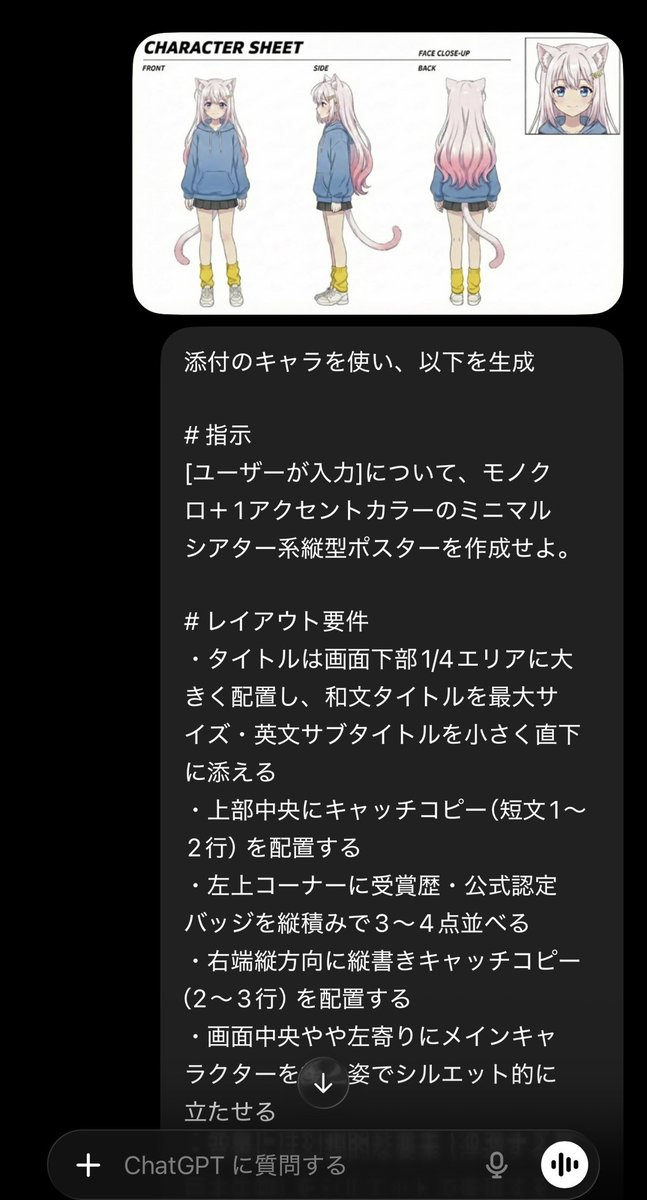
产品视觉 GPT Image 2 提示词:Minimalist Cinematic Vertical Poster with Character Reference
A sophisticated prompt for creating minimalist, monochrome posters with single accent colors while maintaining character consistency from a reference image.
📝 提示词
Using the attached character, generate the following:
# Instructions
Create a minimalist theater-style vertical poster for {argument name="user input" default="[user input]"} using monochrome + {argument name="accent color" default="one accent color"}.
# Layout Requirements
- Place the title largely in the bottom 1/4 area, with the Japanese title at maximum size and the English subtitle small directly underneath.
- Place a catchphrase (1-2 lines) in the top center.
- Stack 3-4 awards/official certification badges vertically in the top-left corner.
- Place a vertical catchphrase (2-3 lines) along the right edge.
- Position the main character as a silhouette from behind, slightly left of the center.
- Represent fantastical elements (floating islands, giant creatures) in the background as silhouettes.
- Place staff credits, release date, and distribution info in a small horizontal line at the bottom.
- Highlight the release date in a large font at the bottom right.
# Design Requirements
- Keep the background monochrome (black to gray gradient).
- Use only one accent color (e.g., vivid cobalt blue or gold).
- Combine silhouette and thin line art styles.
- Emphasize the title text with white + the accent color.
- Create a cinematic and artistic atmosphere overall.
- Avoid colorful backgrounds, excessive decoration, or heavy use of gradients.
- Format: Vertical, aspect ratio 2:3, high resolution.
🎯 适合场景
适合快速搭建产品图、包装展示和品牌海报:主体、材质、背景与商业修图方向已经有框架,换掉变量就能开跑。
💡 改写建议
- 先替换变量里的品类、人物、城市、品牌色,不急着改整段结构。 把主体、构图和风格分开写,后续微调会更稳。