产品展示
界面稿
角色设定
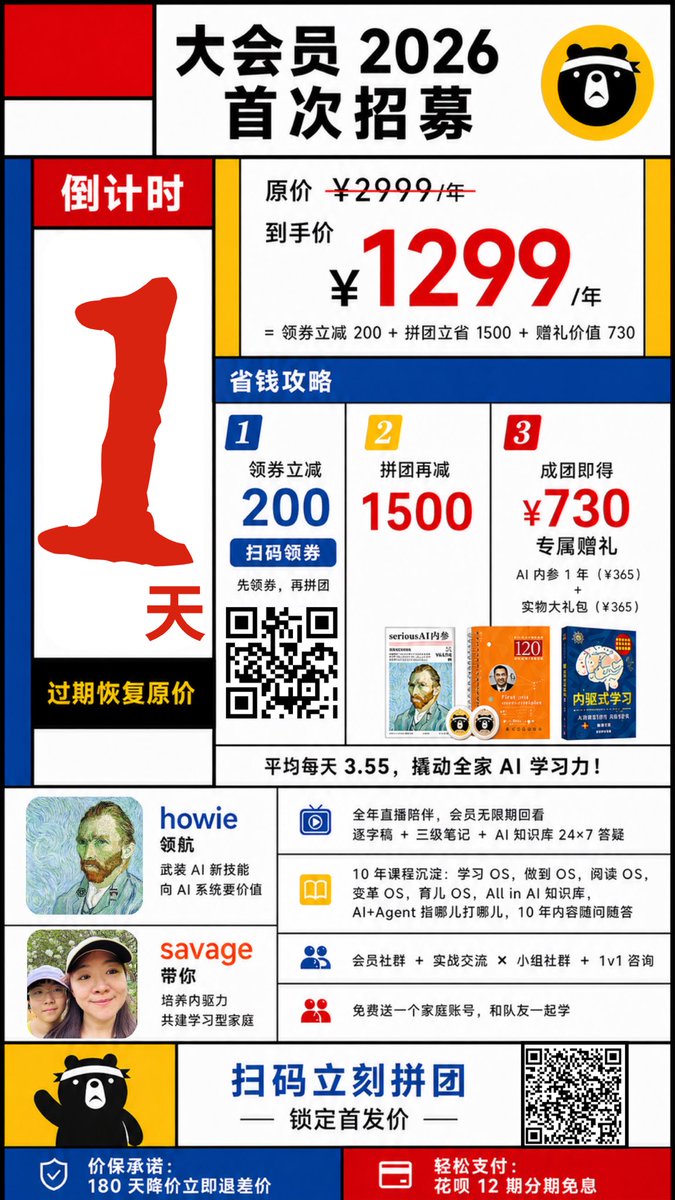
产品视觉 GPT Image 2 提示词:Mondrian-Style Chinese Promo Poster
This prompt generates a colorful geometric Chinese membership recruitment poster for marketing campaigns, sales promotions, and social-media operations graphics.
📝 提示词
Create a bold Chinese promotional poster in a Mondrian-inspired, Fauvist, slightly cubist graphic style with thick black grid lines, flat primary-color blocks, and a clean white background. Vertical smartphone poster, highly structured layout, retail advertisement aesthetic, high contrast, crisp vector-like edges, playful but aggressive sales design. The headline area at the top center is a large white panel with big black Chinese text reading "大会员 2026 首次招募", and a circular yellow badge at the top right containing a simple black cartoon bear face icon. At the top left, include 3 abstract rectangular blocks stacked in a Mondrian composition: one red square, one white rectangle, and one blue vertical rectangle. On the left side create a tall countdown column with a red header labeled "倒计时", a huge rough-edged red number "1" in the center, a red "天" near the bottom, and a black footer strip with yellow text "过期恢复原价". In the main pricing panel to the right, show small black text "原价 ¥2999/年" with a strikethrough over 2999, then larger black text "到手价", then an oversized red price "¥1299" with "/年" in black, and a smaller black formula line below: "= 领券立减 200 + 拼团立省 1500 + 赠礼价值 730". Beneath that, place a full-width blue section bar labeled "省钱攻略". Under it, build a 3-column savings guide with exactly 3 numbered panels: panel 1 has a blue corner label "1", the text "领券立减 200", a blue button-like strip "扫码领券", a smaller line "先领券,再拼团", and a black-and-white QR code; panel 2 has a yellow corner label "2", the text "拼团再减 1500", and one small book or magazine cover thumbnail at the bottom; panel 3 has a red corner label "3", the text "成团即得 ¥730 专属赠礼", with smaller lines "AI 内参 1 年(¥365)" and "实物大礼包(¥365)", plus exactly 2 small gift thumbnails at the bottom. Add a white strip below the 3 columns with bold black text: "平均每天 3.55,撬动全家 AI 学习力!". In the lower middle section, place 2 host/profile blocks in the left column: the first shows a square avatar, the name "howie" in blue, and smaller black text "领航" plus "武装 AI 新技能" and "向 AI 系统要价值"; the second shows a square avatar, the name "savage" in orange-red, and smaller black text "带你" plus "培养内驱力" and "共建学习型家庭". To the right of these profile blocks, create a benefits list with exactly 4 horizontal rows, each with a colored icon on the left and black Chinese text on white: row 1 uses a blue TV or screen icon and text about full-year live companion sessions, replay access, transcripts, notes, and 24×7 AI knowledge support; row 2 uses a yellow book icon and text about 10 years of deep experience, learning OS, becoming OS, reading OS, variable OS, educating children OS, all in AI knowledge base, and long-term Q&A guidance; row 3 uses a blue people icon and text about member community, practical exchange, group community, and 1v1 consultation; row 4 uses a red people icon and text about a free family account so a teammate can study together. Near the bottom, add a yellow panel on the left with a waving full-body black cartoon bear mascot. Across the bottom center place a large blue call-to-action line "扫码立刻拼团" with smaller black decorative dashes and the subtitle "锁定首发价" beneath it. Put a large black-and-white QR code on the bottom right. Finish with a bottom bar split into 2 colored sections: left blue section with a white shield icon and white text "价保承诺:180 天降价立即退差价"; right red section with a white card/payment icon and white text "轻松支付:花呗 12 期分期免息". Use thick black borders around every block, asymmetrical geometric composition, minimal shading, poster-like typography hierarchy, Chinese e-commerce campaign design, energetic and colorful.
🎯 适合场景
适合快速搭建产品图、包装展示和品牌海报:主体、材质、背景与商业修图方向已经有框架,换掉变量就能开跑。
💡 改写建议
- 先替换变量里的品类、人物、城市、品牌色,不急着改整段结构。 把主体、构图和风格分开写,后续微调会更稳。