产品展示
界面稿
故事叙事
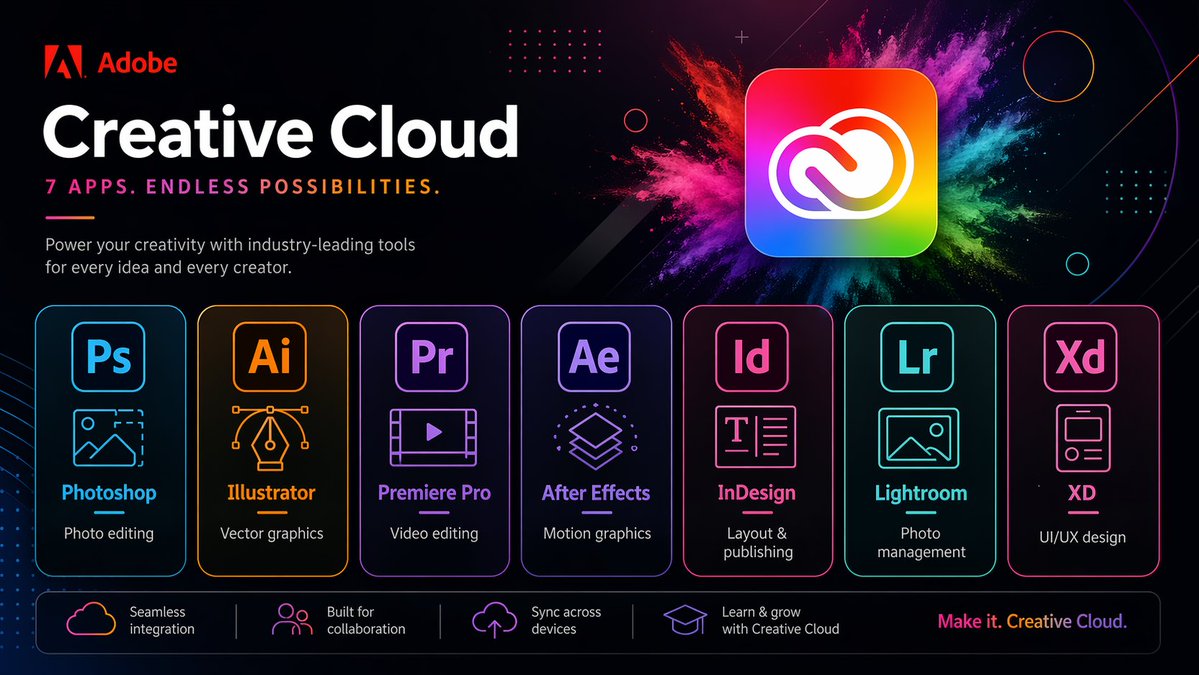
产品视觉 GPT Image 2 提示词:Neon Creative Cloud Promo Poster
A sleek Adobe-style marketing poster showcasing seven Creative Cloud apps in a futuristic neon layout, ideal for recreating branded tech advertisements or app suite promos.
📝 提示词
{"type":"neon promotional tech poster","brand":{"name":"Adobe","logoPosition":"top left"},"headline":{"title":"{argument name="headline text" default="Creative Cloud"}","subtitle":"{argument name="tagline" default="7 APPS. ENDLESS POSSIBILITIES."}","body":"Power your creativity with industry-leading tools for every idea and every creator."},"style":{"background":"deep black with subtle purple and magenta gradients, faint geometric circles, dotted grid accents, and thin diagonal light streaks","look":"sleek futuristic marketing graphic, high contrast, premium tech branding, neon glow edges, crisp vector typography"},"hero":{"position":"upper right","object":"large rounded-square Creative Cloud app icon","appearance":"rainbow gradient square with white Creative Cloud symbol","effects":"explosive multicolor powder burst behind the icon in pink, magenta, purple, blue, teal, green, and yellow"},"layout":{"sections":[{"title":"app cards","position":"center row","count":7,"labels":["image editor","Illustrator","Premiere Pro","After Effects","InDesign","photo editor","XD"],"items":[{"abbr":"Ps","name":"image editor","description":"Photo editing","color":"cyan blue","icon":"landscape image outline with cropped corner selection"},{"abbr":"Ai","name":"Illustrator","description":"Vector graphics","color":"orange amber","icon":"pen nib with bezier handles"},{"abbr":"Pr","name":"Premiere Pro","description":"Video editing","color":"violet purple","icon":"film frame with play button"},{"abbr":"Ae","name":"After Effects","description":"Motion graphics","color":"lavender purple","icon":"stacked layers"},{"abbr":"Id","name":"InDesign","description":"Layout & publishing","color":"hot pink","icon":"text page with T and lines"},{"abbr":"Lr","name":"photo editor","description":"Photo management","color":"teal cyan","icon":"image thumbnail with small circle indicator"},{"abbr":"Xd","name":"XD","description":"UI/UX design","color":"pink magenta","icon":"mobile app wireframe card"}]},{"title":"feature strip","position":"bottom bar","count":4,"labels":["Seamless integration","Built for collaboration","Sync across devices","Learn & grow with Creative Cloud"],"items":[{"icon":"cloud outline","text":"Seamless integration"},{"icon":"group of people","text":"Built for collaboration"},{"icon":"cloud upload","text":"Sync across devices"},{"icon":"graduation cap","text":"Learn & grow with Creative Cloud"}]}],"footer":"{argument name="footer slogan" default="Make it. Creative Cloud."}"},"composition":"wide 16:9 ad layout, large text block on the left, hero icon on the upper right, seven evenly spaced glowing app panels across the middle, slim rounded footer bar across the bottom","rendering":"clean vector illustration, sharp commercial design, luminous outlines, subtle reflections, polished Adobe-style presentation"}
🎯 适合场景
适合快速搭建产品图、包装展示和品牌海报:主体、材质、背景与商业修图方向已经有框架,换掉变量就能开跑。
💡 改写建议
- 先替换变量里的品类、人物、城市、品牌色,不急着改整段结构。 把主体、构图和风格分开写,后续微调会更稳。