产品展示
信息图
界面稿
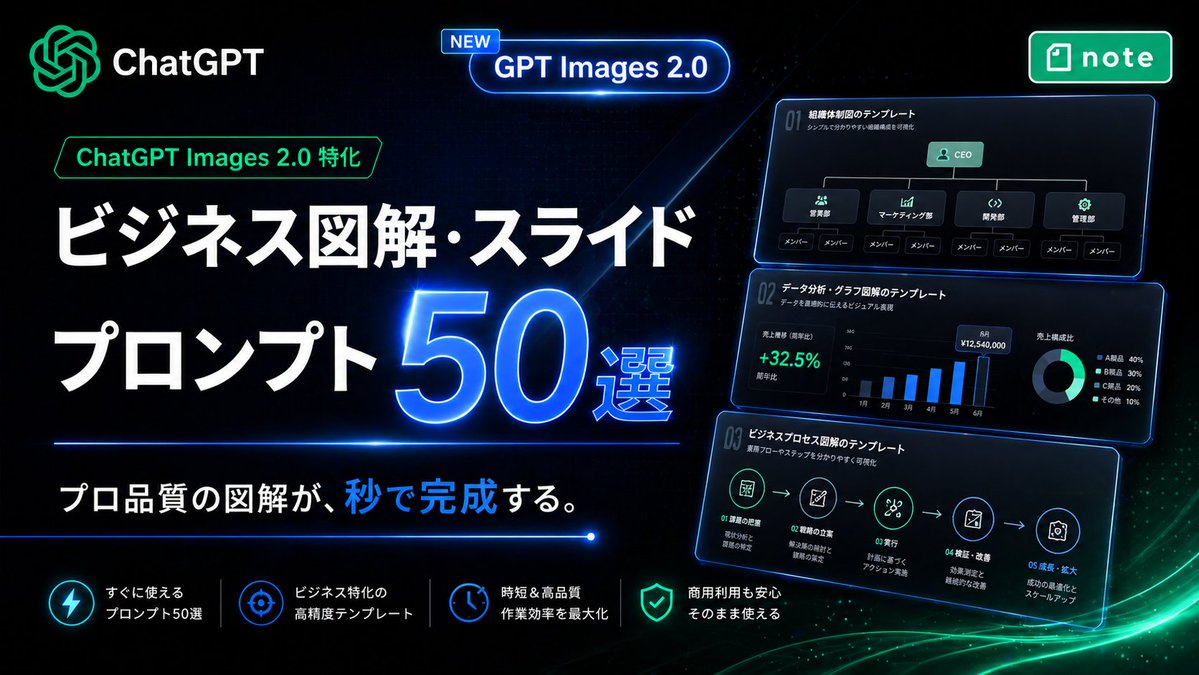
产品视觉 GPT Image 2 提示词:Neon Japanese AI Prompt Promo Banner
A futuristic Japanese landing-page style promotional banner for selling AI assistant image prompt templates for business diagrams, slides, and infographic creation.
📝 提示词
Create a high-impact Japanese promotional hero banner for a digital product about business infographic and slide prompts, in a futuristic neon tech style. Use a wide 16:9 composition with a deep black background, subtle dark blue grid texture, glowing blue light streaks, and soft green energy waves sweeping across the bottom right. The overall look should feel premium, cyber-luminous, modern SaaS marketing, with crisp contrast and polished UI lighting.
Place the AI assistant logo and the word "AI assistant" in the top left, glowing in green and white. Near the upper center, add a rounded glowing blue capsule badge with a small tag that says "NEW" and main text "GPT Images 2.0". In the top right, place a green rounded rectangular app-style badge with the note logo and the word "note".
On the left half, build the main headline stack in Japanese. Add a small green outlined label reading "AI assistant Images 2.0 特化" above the headline. Then place a very large bold white headline on two lines: "ビジネス図解・スライド" and "プロンプト". Next to the second line, place an oversized glowing electric-blue number "50" with a bright neon rim light and the smaller text "選" attached to its lower right. Below the headline, add a thin horizontal blue neon divider line. Under it, place the subheadline in Japanese: "プロ品質の図解が、秒で完成する。" with the character group "秒で" highlighted in bright blue while the rest remains white.
On the right half, show 3 stacked floating dark UI cards with blue neon outlines, each slightly tilted and glowing, like business slide templates preview thumbnails. Count exactly 3 cards. The top card should show an organization chart template with the title "01 組織体制図のテンプレート", a small subtitle line, a CEO box at top, 4 department boxes beneath it, and 8 member boxes total along the bottom row. The middle card should show a data-analysis dashboard template titled "01 データ分析・グラフ図解のテンプレート", with a green percentage "+32.5%", a monthly vertical bar chart with 6 bars labeled from 1月 to 6月, and a donut chart legend with exactly 4 items. The bottom card should show a business process flow template titled "01 ビジネスプロセス図解のテンプレート", with a 5-step horizontal icon flow connected by arrows and small Japanese labels under each step.
Along the bottom, create a row of exactly 4 feature items separated by thin vertical dividers. Each feature item should have a glowing circular icon and two-line Japanese text in white. The 4 features are: "すぐに使える プロンプト50選", "ビジネス特化の 高精度テンプレート", "時短&高品質 作業効率を最大化", and "商用利用も安心 そのまま使える". Use icon styles resembling lightning, target/crosshair, clock, and shield respectively.
Typography should be bold, geometric sans-serif, with extremely large Japanese headline text, clean alignment, and strong hierarchy. Emphasize blue and green neon glows, glossy reflections, luminous edges, and a sleek conversion-focused landing-page aesthetic. No people, no photography, only graphic design, UI cards, icons, and Japanese marketing text.
🎯 适合场景
适合快速搭建产品图、包装展示和品牌海报:主体、材质、背景与商业修图方向已经有框架,换掉变量就能开跑。
💡 改写建议
- 先替换变量里的品类、人物、城市、品牌色,不急着改整段结构。 把主体、构图和风格分开写,后续微调会更稳。