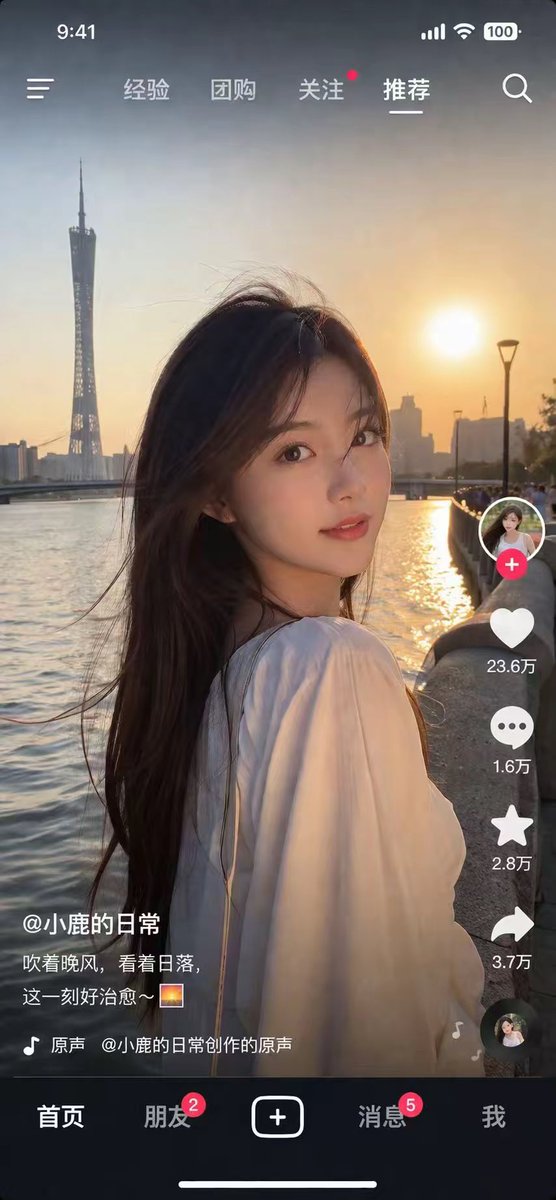
界面稿
角色设定
界面稿 GPT Image 2 提示词:Photorealistic Short Video App Screenshot
Generates a highly realistic screenshot of a mobile short video app featuring a customizable portrait and UI overlays.
📝 提示词
{
"type": "mobile short video app screenshot",
"style": "photorealistic, highly detailed",
"main_image": {
"subject": "{argument name="subject description" default="young Asian woman with long dark hair, wearing a white top, looking back over her shoulder"}",
"lighting": "golden hour, sunset backlight, warm glowing light",
"background": "{argument name="background location" default="riverfront at sunset with a tall twisted tower skyline"}"
},
"ui_overlay": {
"top_bar": {
"left": "time 9:41, menu icon",
"center_tabs": ["经验", "团购", "关注", "推荐"],
"right": "signal, wifi, battery 100, search icon"
},
"right_sidebar": {
"count": 6,
"elements": [
"profile picture with red plus button",
"heart icon with text '{argument name="like count" default="23.6万"}'",
"comment bubble icon with text '1.6万'",
"star icon with text '2.8万'",
"share arrow icon with text '3.7万'",
"spinning record album icon"
]
},
"bottom_left_info": {
"username": "{argument name="username" default="@小鹿的日常"}",
"caption": "{argument name="caption" default="吹着晚风,看着日落,这一刻好治愈~ 🌅"}",
"audio_track": "🎵 原声 @小鹿的日常创作的原声"
},
"bottom_nav": {
"count": 5,
"tabs": [
"首页",
"朋友 (with red badge 2)",
"central square plus button",
"消息 (with red badge 5)",
"我"
],
"footer": "white home indicator line"
}
}
}
🎯 适合场景
适合生成网页、App 或仪表盘界面稿:先保留模块结构,再替换成你的业务文案和品牌视觉。
💡 改写建议
- 先替换变量里的品类、人物、城市、品牌色,不急着改整段结构。 把主体、构图和风格分开写,后续微调会更稳。