产品展示
界面稿
角色设定
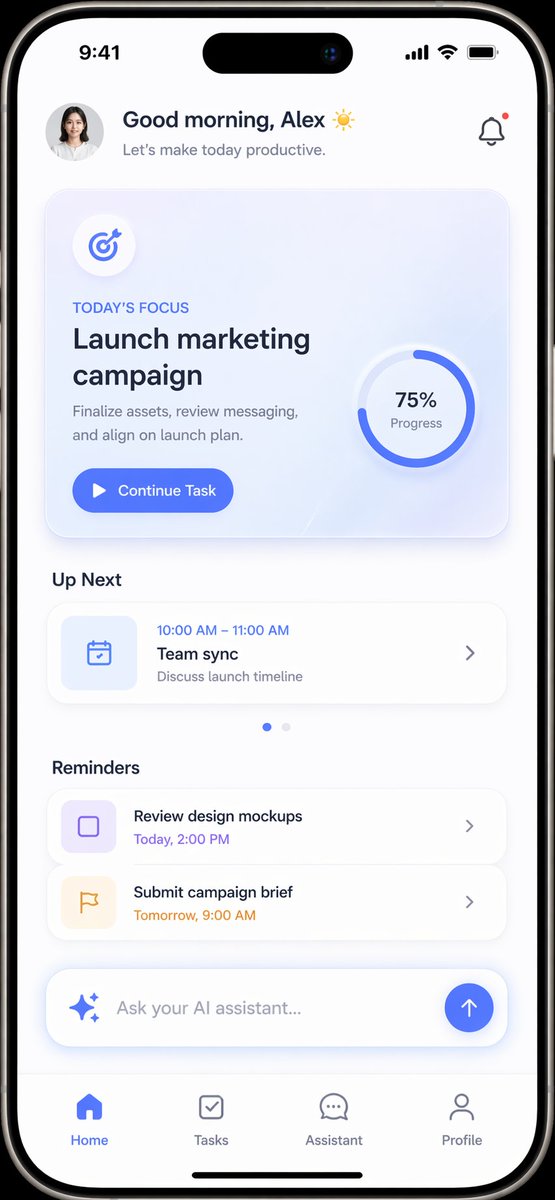
产品视觉 GPT Image 2 提示词:Productivity App UI Mockup
A modern, light-themed mobile app interface for task management featuring a daily focus card, schedule, and AI assistant integration.
📝 提示词
{
"type": "mobile app UI mockup",
"device": "modern smartphone with dynamic island",
"theme": "light mode, minimalist, {argument name="primary color" default="soft blue"} accents, soft drop shadows",
"layout": {
"header": {
"profile": "small circular photo of a woman",
"greeting": "Good morning, {argument name="user name" default="Alex"} ☀️",
"subtitle": "Let's make today productive.",
"icon": "notification bell with red dot"
},
"hero_card": {
"title": "TODAY'S FOCUS",
"headline": "{argument name="focus task" default="Launch marketing campaign"}",
"description": "Finalize assets, review messaging, and align on launch plan.",
"button": "Continue Task",
"graphic": "circular progress ring showing 75% Progress"
},
"sections": [
{
"title": "Up Next",
"count": 1,
"items": ["Team sync (10:00 AM - 11:00 AM)"]
},
{
"title": "Reminders",
"count": 2,
"items": ["Review design mockups", "Submit campaign brief"]
}
],
"bottom_elements": {
"ai_input": "pill-shaped text field with sparkle icon and placeholder '{argument name="ai placeholder" default="Ask your AI assistant..."}'",
"navigation_bar": {
"count": 4,
"tabs": ["Home", "Tasks", "Assistant", "Profile"]
}
}
}
}
🎯 适合场景
适合快速搭建产品图、包装展示和品牌海报:主体、材质、背景与商业修图方向已经有框架,换掉变量就能开跑。
💡 改写建议
- 先替换变量里的品类、人物、城市、品牌色,不急着改整段结构。 把主体、构图和风格分开写,后续微调会更稳。