信息图
界面稿
故事叙事
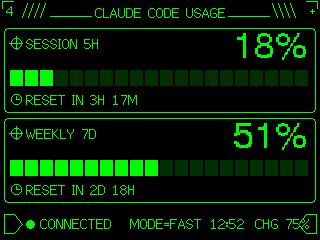
信息图 GPT Image 2 提示词:Retro Claude Code Usage Gauge
Transforms a simple usage meter reference into a neon-green pixel terminal dashboard suitable for an M5Stack-style device UI.
📝 提示词
Using REFERENCE_0 as the functional layout and data source, redesign it as a polished monochrome neon-green retro terminal UI for an M5Stack-style low-resolution display. Keep the same concept of a Claude Code usage gauge with 2 usage panels: SESSION 5H and WEEKLY 7D. Convert the plain progress bars into segmented pixel bars with 24 rectangular blocks each, preserve the approximate usage values but update the visible numbers to {argument name="session percentage" default="18%"} and {argument name="weekly percentage" default="51%"}. Add thin glowing green borders around each panel, pixel/bitmap typography, small target/crosshair icons beside the panel titles, and clock icons beside the reset lines. Replace the simple title with a decorative header reading {argument name="headline text" default="CLAUDE CODE USAGE"}, flanked by terminal-like slashes and line ornaments. At the bottom, add a retro status row with a flag/terminal outline icon, green connection dot, {argument name="connection label" default="CONNECTED"}, MODE=FAST, {argument name="time" default="12:52"}, and CHG 75% with a small battery/charging icon. Use a black background, bright CRT green lines, crisp pixel art styling, and make the result look like a refined embedded-device dashboard rather than a flat chart.
🎯 适合场景
适合做图解、清单、路线图和知识长图:先锁定信息层级,再把文字量控制在模型能稳定处理的范围里。
💡 改写建议
- 先替换变量里的品类、人物、城市、品牌色,不急着改整段结构。 把主体、构图和风格分开写,后续微调会更稳。